The quick answer
- Got one TV brand? Use its free official app: Roku, Fire TV, SmartThings (Samsung), LG ThinQ, Google TV or VIZIO.
- Have an Apple TV or an AirPlay TV? The remote in Control Center is already on your iPhone.
- Several brands in one house? RemoteTv never shows ads and has a one-time price. If you need Fire TV too, TV Remote by EVOLLY covers the most brands.
- Avoid weekly subscriptions. A remote app shouldn't cost more than a new remote.
Search the App Store for “TV remote” and you'll find hundreds of apps, most of them free to download. Fewer are free to use. Many universal remotes show ads until you subscribe, and some charge by the week. Meanwhile, every major TV brand gives away an official app that does the job for nothing.
We compared six official apps, the three most popular universal remotes and one of our own, plus the remote Apple hides in Control Center. We looked hard at two things the download button doesn't show: what you'll pay, and what the app shares. Six of the ten apps carry a privacy label saying your data may be used to track you across other companies' apps and websites.
TV remote apps compared
Filter by your TV brand, or by what matters to you. Scores are explained in how we compared.
| App | Score | Works with | What's free | Paid plan | Ads | Tracks you* | US rating |
|---|---|---|---|---|---|---|---|
 1. RokuBest for Roku |
Roku players and Roku TVs | Everything | None | Not mentioned | Yes | 4.7 (6.4M) | |
 2. Fire TVBest for Fire TV |
Fire TV sticks, Fire TV Cube and Fire TV smart TVs | Everything | None | Not mentioned | No | 4.5 (1.4M) | |
 3. SmartThingsBest for Samsung TVs |
Samsung smart TVs (plus other smart home devices) | Everything | None | Not mentioned | No | 4.6 (861K) | |
 4. LG ThinQBest for LG TVs |
LG webOS smart TVs (plus LG appliances) | Everything | None | Not mentioned | Yes | 4.6 (242K) | |
 5. Google TVBest for Google TV & Android TV |
Google TV and Android TV devices, including many Sony, TCL and Hisense TVs | Everything | None | Not mentioned | No | 4.3 (4.9K) | |
 6. VIZIOBest for Vizio |
VIZIO TVs and soundbars | Everything | None | Not mentioned | Yes | 4.6 (73K) | |
 7. RemoteTvBest ad-free universal remote · Our app |
Samsung, LG, Roku, Vizio, and Google TV / Android TV | First connection, up to 24 hours | Optional ($0.99/yr or $2.99 once) | Never | No | New | |
 8. TV Remote (EVOLLY)Most popular universal remote |
Samsung, Roku, LG, Sony, Fire TV, Android TV, Vizio, Hisense | Basics, with ads | Optional (weekly, monthly, yearly or one-time) | Yes, until you pay | Yes | 4.4 (635K) | |
 9. Universal TV RemoteUniversal remote with a lifetime option |
"Hundreds of models" (brands not listed) | Limited, Premium for full access | Optional ($19.99/yr or $14.99 lifetime) | Not stated | Yes | 4.6 (96K) | |
 10. Universal Remote TV ControlPopular, but watch the weekly price |
Roku, TCL, Sony, LG, Samsung, Android TV, Hisense, Fire TV, Philips, Vizio | Basics, with ads | Optional ($6.99 per week) | Yes, until you pay | Yes | 4.7 (144K) | |
 Apple TV RemoteBuilt in, not scored |
— | Apple TV and AirPlay-compatible smart TVs | Everything | None | No | No | Built in |
*From each app's App Store privacy label (“Data Used to Track You”). Ads and prices as stated in each App Store listing; “Not mentioned” means the listing doesn't say. Prices and ratings from the US App Store, November 12, 2026.
Official apps from the TV brands
These are free and made by the company behind your TV or streamer. They only work with their own brand, but they're the most reliable way to control it.
Roku Remote (Official)
What we like
- Everything is free: remote, keyboard, voice search and casting
- Private listening: plug headphones into your phone and watch without waking the house
- Add and launch channels from your phone
- The most-rated remote app on the App Store
Keep in mind
- Roku devices only
- Its privacy label lists contact info, search history and usage data used to track you
- Some features need you to sign in to your Roku account
If you have a Roku, stop here. The official app is free, has no paywall, and does more than the plastic remote: you get a full keyboard for search and passwords, voice search, and photo and video casting. Its best feature is private listening. Plug headphones into your phone and the TV's sound plays through them.
The catch is privacy. Roku's App Store label lists contact info, search history, identifiers and usage data as data that may be used to track you across other companies' apps and websites. That's more than you'd expect from a remote.
The best free remote for any Roku player or Roku TV, with the best extras. Just know it shares more data than most.
Amazon Fire TV
What we like
- A new remote with both a directional pad and a touchpad
- Type with your phone's keyboard instead of the on-screen grid
- Search and build a watchlist across your services
- Helps set up a new Fire TV
Keep in mind
- Needs an Amazon account
- Fire TV devices only
- Some data is linked to your Amazon identity
Amazon's own app is the safe choice for any Fire TV. The latest update redesigned the remote with both a directional pad and a touchpad, and lets you pick classic or natural scrolling. Typing with your phone's keyboard makes searching for a show far less painful than the on-screen grid.
You'll need to sign in with your Amazon account, and some data is linked to it, but the privacy label doesn't list anything used to track you.
Free, solid and made by the people who make your Fire TV. The obvious pick for Fire TV owners.
SmartThings
What we like
- Samsung's official way to control its smart TVs
- Free, with nothing locked behind a paywall
- The best privacy label of the official apps: nothing linked to you
- Also controls your other smart home devices
Keep in mind
- The TV remote is one part of a big smart home app
- More taps to reach the remote than a dedicated app
Samsung's official TV controls live inside SmartThings, the app it uses for its whole smart home range. Add your TV once and you get a remote with navigation, volume and channels, alongside your other Samsung and third-party devices.
That makes it heavier than a dedicated remote, but it's free and official. It also has the cleanest privacy label of the official apps. The data it collects isn't linked to you, and none of it is used to track you.
Free, official and private. If your TV is a Samsung, start here.
LG ThinQ
What we like
- LG's official app for its webOS TVs
- Free, with no paywall
- Can switch newer webOS TVs on and off
- One app for LG TVs and appliances
Keep in mind
- The remote is buried in an appliance app
- Some older TVs can only be turned off, not on
- Its privacy label lists identifiers used to track you
Like Samsung, LG puts its TV remote inside a bigger app. LG ThinQ also runs washing machines, fridges and air conditioners, so the remote is a few taps away. Once your TV is added you can control it, launch apps and share content from your phone.
Power-on depends on the TV's software: newer webOS models can be switched on from the app, while some older ones can only be turned off. The privacy label lists identifiers used to track you, and a long list of data linked to you.
The official, free option for LG TVs. Good enough for most people, if not the quickest to reach.
Google TV
What we like
- Works with every TV and streamer running Google TV or Android TV
- Type passwords and searches with your phone's keyboard
- A watchlist shared across your devices
- Free, with nothing used to track you
Keep in mind
- The remote sits inside a movie and TV discovery app
- A long list of data linked to your Google account
- Not updated since June 2026
Plenty of TVs run Google TV or Android TV under their own badge, from many Sony, TCL and Hisense sets to the Chromecast with Google TV. The Google TV app has a remote built in for all of them. Its handiest feature is typing with your phone's keyboard, which makes Wi-Fi passwords and long titles bearable.
The app is really a place to browse shows and keep a watchlist, so the remote is one button away rather than front and centre. Nothing is used to track you, but a lot is linked to your Google account.
The free choice for any Google TV or Android TV set. Check what your TV runs before you look anywhere else.
VIZIO Remote (Official)
What we like
- Controls VIZIO TVs and soundbars, including bass and treble
- Voice control and search across streaming services
- Cast photos and videos with VIZIOgram
- 300+ free live channels to watch on your phone
Keep in mind
- VIZIO devices only
- Its privacy label lists identifiers and usage data used to track you
- Free live TV needs a VIZIO account
VIZIO's app goes further than most official remotes. As well as the TV, it controls VIZIO soundbars, down to bass, treble and sound modes. Voice control, search across your streaming services and photo casting are all free.
It also doubles as a free TV app, with more than 300 live channels you can watch on your phone after creating a free VIZIO account. As with Roku and LG, the privacy label lists data used to track you.
The best official app for soundbar control as well as the TV. Free for anyone with VIZIO gear.
Universal remote apps
Universal remotes work with several brands in one app. That's handy if you have more than one kind of TV, but this is where the ads and subscriptions are.
RemoteTv
What we like
- Never shows ads, even before you pay
- One app for Samsung, LG, Roku, Vizio and Google TV sets
- Pay once for lifetime access, or yearly
- No data collected, according to its privacy label
Keep in mind
- The free session lasts one connection, up to 24 hours
- Doesn't support Fire TV
- Too new to have US ratings yet
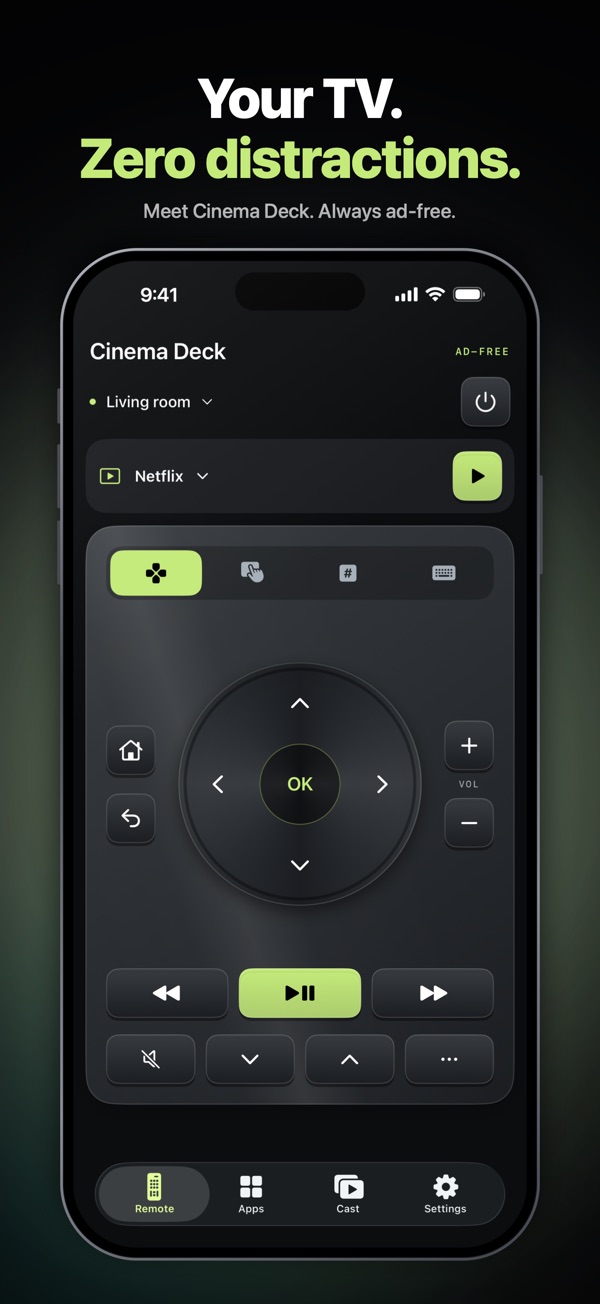
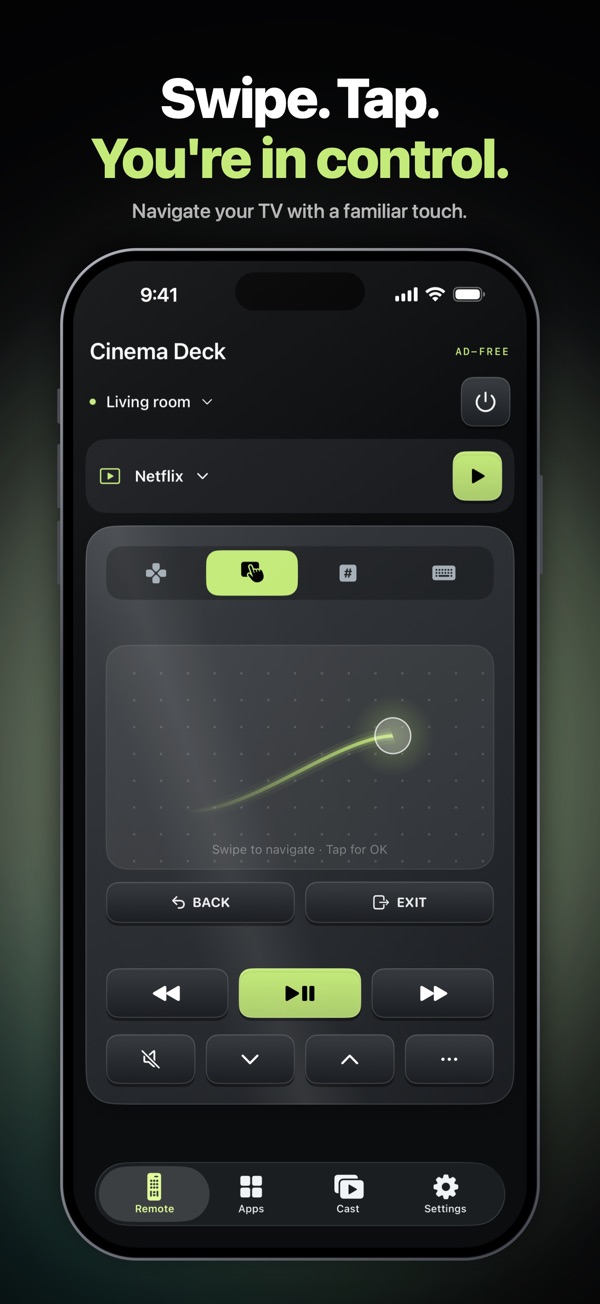
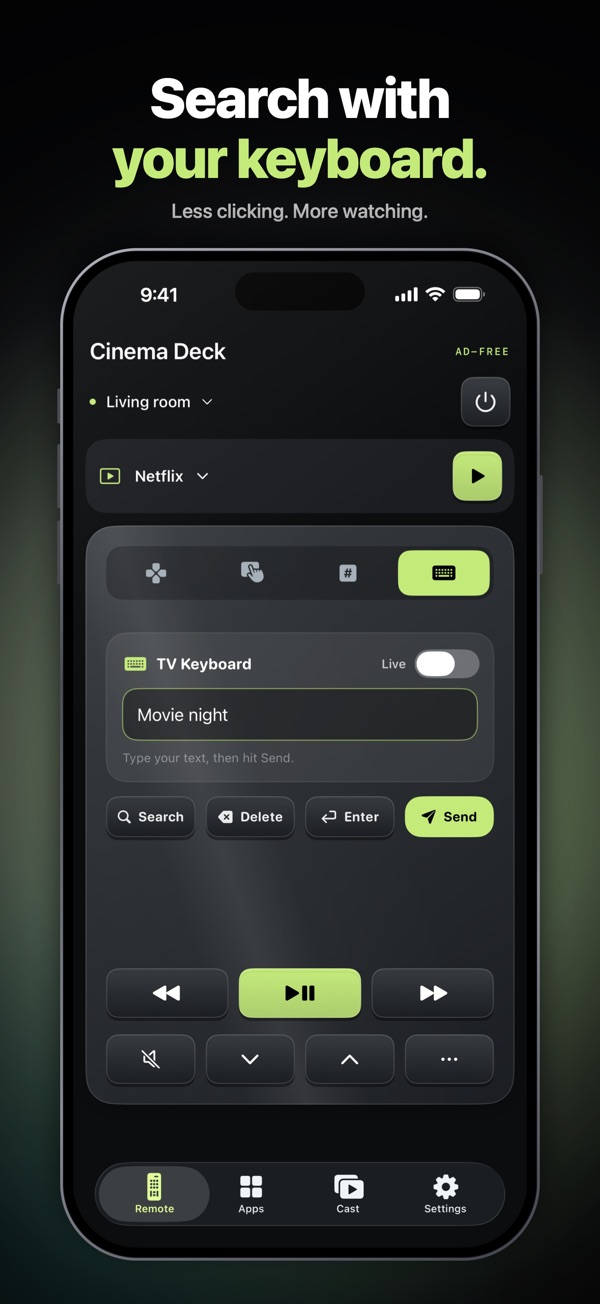
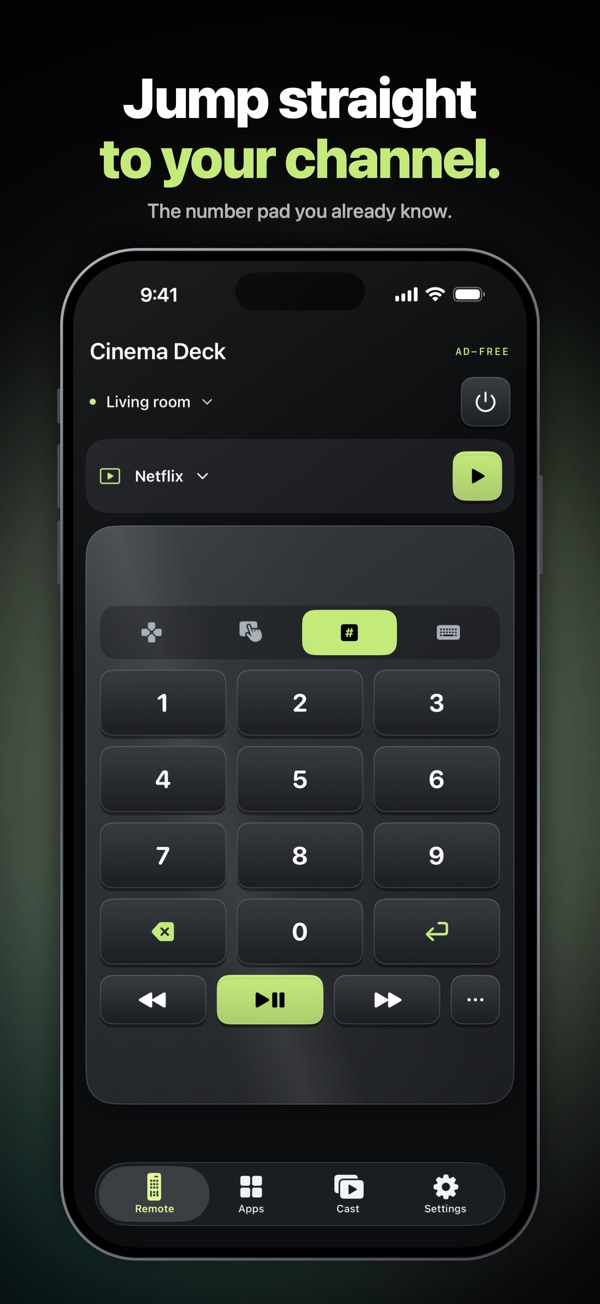
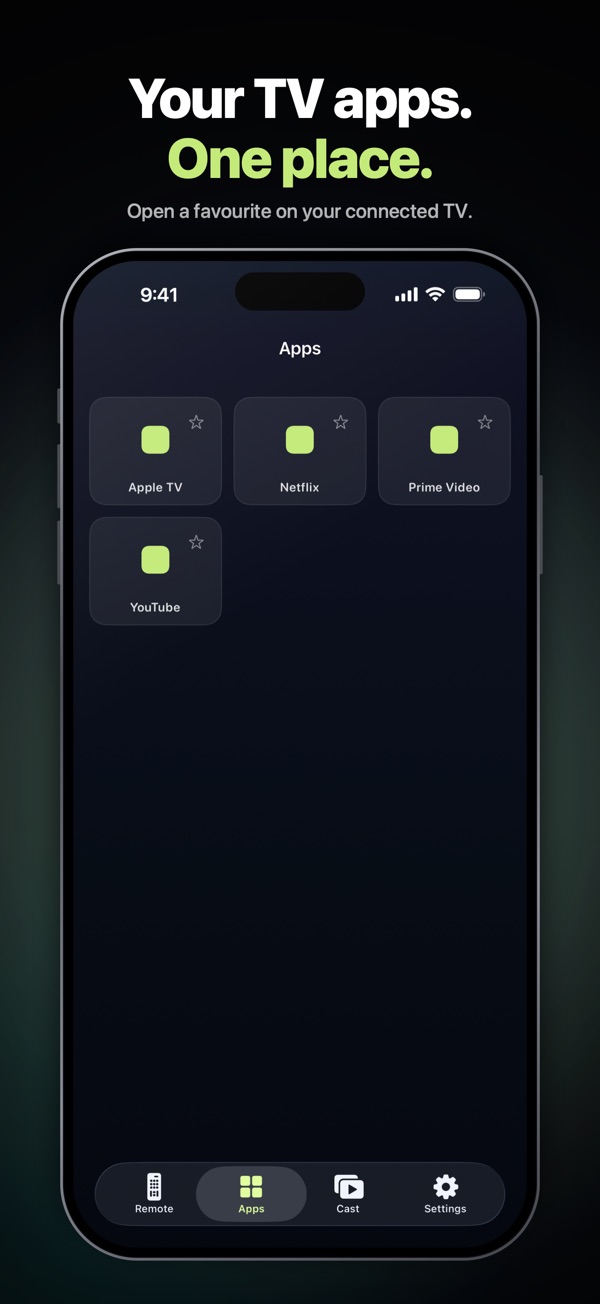
This one is ours, so weigh our words accordingly. We made RemoteTv for homes with more than one brand of TV, where juggling three official apps gets old. It works over Wi-Fi with Samsung, LG, Roku, Vizio, and Google TV or Android TV sets. You get a directional pad, a touchpad, a number pad and a real keyboard, and it can launch TV apps and cast photos and videos.
What sets it apart from the other universal remotes is that it never shows ads, and it collects no data. Your first connection is free for up to 24 hours with every feature unlocked, and there's no automatic charge when it ends. After that, you can pay once for lifetime access or choose a yearly plan. On iPhone Duo, its Movie-night Clapper opens a TV app when you close the phone.
The universal remote we'd want: no ads, no tracking, and a one-time price. Try it on your own TV before you pay.
TV Remote – Universal Control
What we like
- Supports the widest range of brands here, including Fire TV
- Finds TVs on your Wi-Fi automatically
- Large touchpad, keyboard and voice search
- A one-time Premium option alongside subscriptions
Keep in mind
- Ads until you pay
- The paywall offers weekly and monthly subscriptions, which add up fast
- Its privacy label lists location and usage data used to track you
With over 600,000 ratings, this is the most popular universal remote on the App Store. It finds smart TVs on your network and works with a long list of brands: Samsung, Roku, LG, Sony, Fire TV, Android TV, Vizio and Hisense. The touchpad and keyboard are good.
The free version shows ads, and Premium removes them. Read the purchase screen carefully: alongside a one-time payment, it offers yearly, monthly and weekly subscriptions. The privacy label lists location, identifiers, usage data and diagnostics as data used to track you.
Broad brand support and a good touchpad. Take the one-time option if you upgrade, and skip the weekly plan.
Universal TV Remote
What we like
- A touchpad-first design that's quick to navigate
- Can wake many newer TVs with Wake-on-LAN
- A $14.99 lifetime purchase as well as a yearly plan
- Well rated by nearly 100,000 people
Keep in mind
- You need the physical remote the first time, before Wake-on-LAN works
- Doesn't say which brands it supports
- Its privacy label lists location and identifiers used to track you
Kraftwerk 9 makes several remote apps, including brand-specific ones for Roku, LG and Samsung. This is its universal version. It's built around a touchpad, with swipes instead of arrow buttons, and it can switch many newer TVs on using Wake-on-LAN.
There's a catch the listing is honest about: Wake-on-LAN only works after you've connected once, so you'll need the hardware remote for the first setup. Premium costs $19.99 a year, or $14.99 once for lifetime access. The privacy label lists location, identifiers and usage data used to track you.
A capable universal remote. If you buy, the $14.99 lifetime option is better value than the subscription.
Universal Remote TV Control
What we like
- Ten TV brands listed, from Roku to Philips
- Connects without pairing codes on supported TVs
- Keyboard, voice search and casting
- Highly rated
Keep in mind
- Premium is $6.99 a week, about $363 a year if you keep it
- Ads in the free version
- Its privacy label lists identifiers used to track you
On features alone, this is a good universal remote. It lists ten brands, connects without pairing codes on supported TVs, and adds keyboard input, voice search and casting. Its 4.7 rating shows plenty of people are happy with it.
The price is the problem. Premium, which removes ads and unlocks every feature, is $6.99 per week according to the App Store listing. Kept for a year, that's about $363, far more than a replacement physical remote. If you try it, set a reminder to cancel.
Works well, but the weekly subscription is hard to justify. Use the free version, or pick an app with a one-time price.
Apple TV Remote in Control Center
Before you download anything, check Control Center. Apple builds a remote into every iPhone. It works with Apple TV 4K, Apple TV HD and AirPlay-compatible smart TVs, which includes many recent Samsung, LG, Sony and Vizio models. Add the TV to the Home app first, then open the remote from Control Center and pick your TV.
It's basic, with a touch area, menu and play buttons, but it's free, has no ads and needs no extra app. If the remote button is missing, add it in Control Center's edit menu by searching for Remote.
Free, private and already on your phone. If your TV supports AirPlay, try it first.
Which TV remote app should you get?
How iPhone TV remote apps work
A plastic remote sends infrared light. iPhones don't have an infrared blaster, so remote apps talk to your TV over your home Wi-Fi instead. That's why your iPhone and TV must be on the same network, and why these apps only work with smart TVs and streaming devices.
Each TV brand uses its own system, such as Tizen on Samsung, webOS on LG, Roku OS, and Google TV or Android TV. Official apps support one system. Universal remotes support several, and the features you get can still vary from model to model. If you have an older TV without Wi-Fi, plug in a streaming stick and use its official app.
Can an app turn the TV on?
Sometimes. When a TV is switched off, its network connection is often asleep too. Many newer TVs can be woken over the network after you've paired them once. For a first setup, or for older TVs, keep the physical remote handy.
How we compared
On November 12, 2026 we checked each app's US App Store listing: price and in-app purchases as described in the listing, the privacy label, the rating and number of ratings, supported brands and the date of the latest update. Feature claims come from those listings, and we note where something needs a paid plan.
Each app gets five scores out of 10, combined with fixed weights: remote features 30%, value 20%, privacy 20%, reputation 15%, tv support 15%. Value rewards apps that are free to use, not just free to download, and marks down weekly subscriptions. Privacy starts at 10 and drops for data used to track you or linked to your identity. TV support reflects how many brands an app works with. Apple's built-in remote isn't scored because it's part of iOS.
The list is grouped into official apps and universal remotes rather than strictly ranked, so compare scores within each group. Prices and plans change often. If you spot something out of date, tell us via our about page.
TV remote app FAQ
What is the best free TV remote app for iPhone?
The official app from your TV's maker: Roku Remote for Roku, Amazon Fire TV for Fire TV, SmartThings for Samsung, LG ThinQ for LG, Google TV for Google TV and Android TV, and VIZIO Remote for Vizio. They're completely free with no paywall. Apple TV and AirPlay TVs also work with the free remote in Control Center.
Can my iPhone work as a TV remote without Wi-Fi?
Not usually. iPhones don't have an infrared (IR) blaster, so they can't send signals the way a plastic remote does. Remote apps talk to smart TVs over your home Wi-Fi network instead, so your iPhone and TV must be on the same network. Apps that claim IR control on iPhone need an extra hardware accessory.
Can I use my iPhone as a remote for a non-smart TV?
Not directly. A TV without Wi-Fi only understands infrared, which iPhones can't send. You can plug a streaming stick such as a Roku, Fire TV or Chromecast into it, then control that with its official app.
Is there a TV remote app without ads?
Yes. Apple's built-in remote in Control Center has no ads, and the official brand apps don't charge for any remote features. Among universal remotes, RemoteTv never shows ads, even in its free session, while most others show ads until you pay.
Is there a universal remote app without a subscription?
Yes, a few offer a one-time purchase. RemoteTv has a lifetime option, Kraftwerk 9's Universal TV Remote sells lifetime access for $14.99, and EVOLLY's TV Remote offers a one-time payment alongside its subscriptions.
How do I turn on my TV with my iPhone?
It depends on the TV. Many newer smart TVs can be woken over the network once they've been paired, through features like Wake-on-LAN, and newer LG webOS TVs can be turned on from LG ThinQ. If the TV is fully powered off, or it's the first setup, you'll usually need the physical remote once.
Can I use my iPhone as a remote for my Samsung TV?
Yes. Samsung's official option is the SmartThings app, which is free. Universal remotes such as RemoteTv, TV Remote by EVOLLY and Universal Remote TV Control also support Samsung TVs. Many recent Samsung TVs work with Apple's Control Center remote too, through AirPlay.
Why does my TV remote app keep disconnecting?
Check that your iPhone and TV are on the same Wi-Fi network, not a guest network or a different band with client isolation. Restart both devices and update the TV's software. Some TVs also drop network connections in deep standby, so look for a setting that keeps networking on.
Sources
- US App Store listings, privacy labels and release notes for each app, checked November 12, 2026.
- Apple Support: Set up the Apple TV Remote on your iPhone or iPad