The quick answer
- Want the Duo to become a little computer? Tiny Computers for fun, UTM SE to run real old systems.
- Own a Mac? Smart Mouse & Keyboard turns the Duo into its keyboard and trackpad.
- Want something useful every day? Things 3, Halide and Netflix are the best everyday upgrades.
- Just want to smile? Deck-Man turns your music into cassettes.
Apple says more than 100,000 apps are now built for iPhone Duo. That number hides a lot of variety. Some apps simply fill the bigger screen. A handful rethink what a phone that folds can do: they split into a screen and a keyboard, react when you close the phone, or make each pose feel like a different device.
Those are the apps we went looking for. We split them into two groups: five fun apps and mini computers that only make sense on a foldable, and five everyday apps that get properly better on the 7.6-inch inner screen.
What “built for iPhone Duo” actually means
The Duo has a 5.4-inch cover screen and a 7.6-inch inner screen, and it can sit in several poses: closed, fully open, half open like a book, or half folded on a table like a tiny laptop. Apps built with Apple's iOS 27.1 tools or later can fill the whole inner screen. Older apps still work, but they run in a phone-sized area with black bars around them.
The best Duo apps go further and use the poses themselves. Here's what to look for:
iPhone Duo apps compared
Use the filters to narrow the list. Scores are explained in how we chose.
| App | Score | Price | Subscription | How it uses the fold | Pencil | Data* | US rating |
|---|---|---|---|---|---|---|---|
 1. Tiny ComputersBest mini computer |
$3.99 | None | Tabletop: screen up, keyboard flat | — | Not collected | 4.6 (97) | |
 2. UTM SEBest for running real old systems |
Free | None | Laptop: bottom half is a keyboard or touchpad | — | Not linked to you | 3.8 (567) | |
 3. DeltaBest for retro games |
Free | None | Turns into a Nintendo DS; closing it sleeps the game | — | Not collected | 4.8 (28,362) | |
 4. Smart Mouse & KeyboardBest for controlling your Mac · Our app |
$2.99 | None | Laptop: Mac screen up, keyboard and trackpad below | — | Not collected | New | |
 5. Deck-ManMost fun |
$4.99 | None | Insert a tape, then close the phone to play | ✓ | Not collected | 4.6 (219) | |
 6. Things 3Best for getting organised |
$9.99 | None | Sidebar for your lists when open; adapts to every pose | — | Linked to you | 4.8 (28,096) | |
 7. TypeDrawBest notebook |
$4.99 | None | Closed it's a book cover; open it's two pages | ✓ | Not collected | 4.5 (81) | |
 8. NetflixBest for watching |
Free | Required | Browse clips on the cover screen, unfold to keep watching | — | Linked to you | 4.7 (7.6M) | |
 9. FlightyBest for travel |
Free | Optional | Native layout; more flight detail on the open screen | — | Linked to you | 4.8 (161,536) | |
 10. Halide Mark IIIBest camera app |
Free | Optional | A different camera for each pose, including a waist-level viewfinder | — | Not linked to you | 4.4 (13,698) |
*From each app's App Store privacy label. None of the ten lists “Data Used to Track You”. “Optional” means the app works without paying but has a paid plan. Prices and ratings from the US App Store, November 12, 2026.
Fun apps and mini computers
These five only really make sense on a phone that folds. Three of them turn the Duo into a small computer or console.
Tiny Computers
On the fold: Tabletop: screen up, keyboard flat
What we like
- The Duo literally becomes the computer: screen above, keyboard below
- Ten machines, from a 1984 Macintosh and a Commodore 64 to an iMac G3 and Windows XP
- Fifty hidden secrets, with hints when you get stuck
- No ads, subscriptions or in-app purchases, and no data collected
Keep in mind
- A toy, not a tool: you won't get work done on it
- A big download at about 425 MB
This is the app people show their friends. Fold the Duo into tabletop mode and the top half becomes a little monitor while the bottom half lies flat as a working keyboard. It stops looking like a phone and starts looking like a tiny Macintosh or Amiga on your desk. Close the phone and the cover screen turns into a shelf where you pick your next machine.
There's more to do than you'd expect. Each of the ten computers has a command line, a paint program or a desktop game, and every one hides five secrets from real computing history. Type 10 PRINT on the Commodore, or fill the old Mac's memory until the bomb appears. A hint system nudges you one step at a time, so it never gets frustrating.
In-app purchases: None. All ten computers are included.
The best demo of what a folding iPhone can be. For $3.99 once, it's an easy yes if you grew up with any of these machines.
UTM SE
On the fold: Laptop: bottom half is a keyboard or touchpad
What we like
- A real emulator, not a simulation: runs x86, ARM, PowerPC and RISC-V systems
- Fold it like a laptop and the bottom half becomes a keyboard or touchpad
- Free, with pre-built machines to get started
- New snapshots let you save a VM and return to it later
Keep in mind
- Made for classic software and old games, not modern desktops
- Setting up your own machine takes some know-how
- The lowest rating on this list, at 3.8
Where Tiny Computers recreates old computers, UTM SE actually runs them. It's built on QEMU, the same emulator developers use on desktops, and it can boot real operating systems on several processor types. The version 5 update added the feature that earns it a place here: fold your Duo like a laptop and the bottom half turns into a keyboard or a touchpad for the virtual machine.
It's a tinkerer's app. The pre-built machines get you going quickly, but the fun is in setting up an old Linux, DOS or classic Windows install and seeing it run on a phone. Keep expectations sensible: it's aimed at classic software, so treat it as a time machine, not a replacement for a PC.
In-app purchases: Listed on the App Store. The emulator itself is free.
The closest you'll get to a real mini computer on iPhone Duo. Free, powerful and a little fiddly, which is part of the charm.
Delta
On the fold: Turns into a Nintendo DS; closing it sleeps the game
What we like
- The Duo's two halves make a convincing Nintendo DS
- Close the phone and DS games go to sleep, like shutting a real DS
- Controller skins designed for every pose, portrait and landscape
- Free, highly rated, and collects no data
Keep in mind
- You need to supply your own games
- No 3DS support
Delta has been the go-to game emulator on iPhone since Apple allowed emulators, and version 2.0 took the Duo seriously. Open the phone and Nintendo DS games fill both halves, top screen above, touch screen below, just like the original hardware. Fold it shut and the game goes to sleep. It's a small detail that makes it feel like a real console in your hand.
It isn't only DS. Delta also plays NES, SNES, Nintendo 64, Game Boy, Game Boy Advance and now Sega Genesis games. It supports PlayStation, Xbox and Switch controllers, and it can sync your saves across devices. You'll need to supply the games yourself.
In-app purchases: Optional in-app purchases are listed. The emulator is free.
If you download one free app on a new Duo, make it this one. Nothing shows off the fold better for the price of nothing.
Smart Mouse & Keyboard
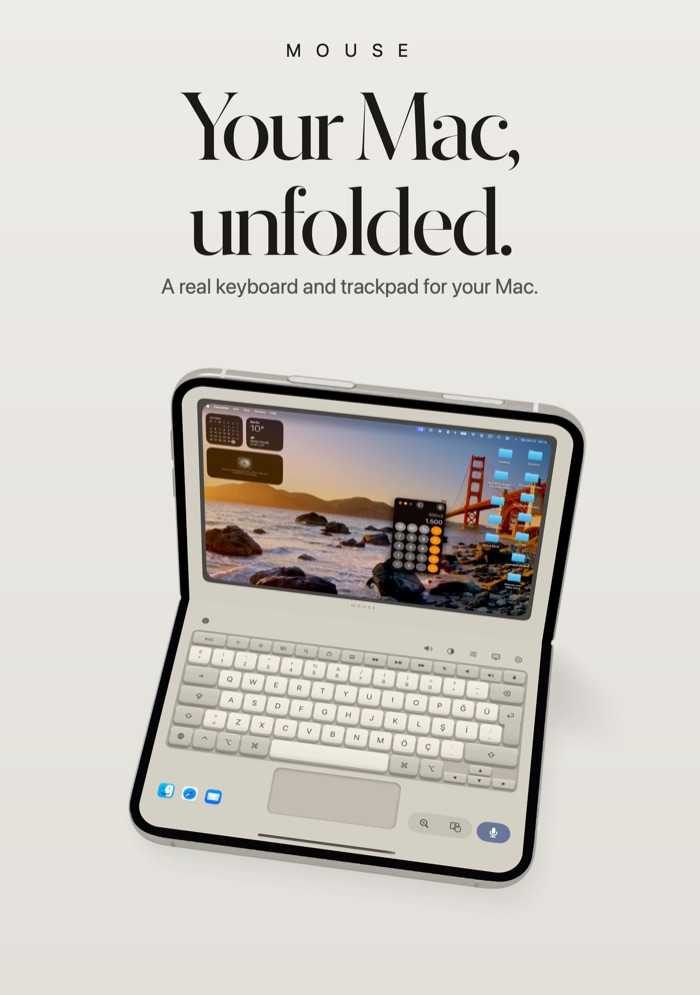
On the fold: Laptop: Mac screen up, keyboard and trackpad below
What we like
- Laptop posture turns the Duo into a tiny MacBook for your real Mac
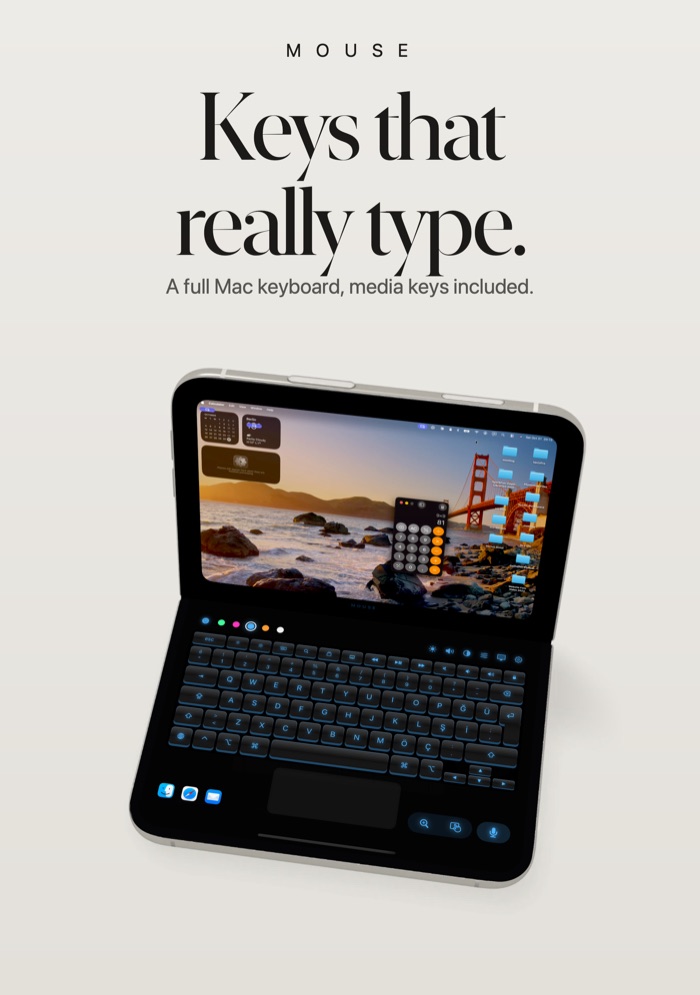
- A full Mac keyboard and trackpad, plus a live view of the Mac's screen
- $2.99 once, with no account, no ads and no data collected
- Encrypted pairing with a matching code on both devices
Keep in mind
- Needs the free Mac companion and the same Wi-Fi network
- Mac only: no Windows support
- Too new to have US ratings yet
This one is ours, so read it with that in mind. We're including it because it does something nothing else on this list does: it turns the Duo into a small laptop for the Mac you already own. Fold the phone into laptop posture and your Mac's live screen fills the top half, while a full keyboard and a trackpad sit on the half resting on the table.
It's handy for a Mac connected to a TV, for presentations, or for typing from the sofa. Version 2.1 added the live screen view, so you can click, drag, scroll and pinch to zoom on the Mac's desktop. You choose your keyboard style too: Dark, Light, Backlit, Platinum, Ocean or Aluminium. The phone talks to a free companion app on the Mac over your local Wi-Fi, and pairing is encrypted.
The main alternative is Astropad Workbench, which is free, also supports iPhone Duo and adds a remote terminal. It's built for reaching your Mac from anywhere and checking on long-running jobs. Smart Mouse & Keyboard is the simpler pick if you want a keyboard, trackpad and media controls for a Mac in the same room, for a one-time price.
In-app purchases: None. The Mac companion app is a free download.
The most useful mini computer trick on the Duo, if you own a Mac. One-time $2.99, with no data collected.
Deck-Man
On the fold: Insert a tape, then close the phone to play
What we like
- Your albums become cassettes; close the Duo and the tape starts playing
- Real mechanical clicks recorded from a portable cassette player
- Works with Apple Music and your own music files
- Buy once: no ads, subscriptions or in-app purchases
Keep in mind
- A music player and nothing more
- Doesn't support Spotify or other streaming services
Deck-Man is pure nostalgia, and it's very well made. Open the phone and your albums appear as cassette tapes. Pick one, slide it into the player, then snap the Duo shut to start listening, like closing the lid of an old portable. The play, rewind and fast-forward buttons click with sounds recorded from the real thing.
It plays music from Apple Music and from files on your phone. The latest update even lets you rewind a tape with Apple Pencil, the way people once wound cassettes with a pencil. It does nothing else, and that's the point.
In-app purchases: None. No ads, upsells or subscriptions.
The most charming app on the Duo. $4.99 for something that makes you smile every time you close your phone.
Everyday apps that get better on the fold
These are apps you might use every day. Each one has a proper iPhone Duo layout, and the bigger screen makes a real difference.
Things 3
On the fold: Sidebar for your lists when open; adapts to every pose
What we like
- A proper Duo layout for closed, open, book and Split View poses
- A new sidebar shows all your lists when the phone is open
- Controls move to a bar on the right, within reach of your thumb
- Pay once, no subscription
Keep in mind
- $9.99 up front, with no free trial on iPhone
- No collaboration or shared lists
Things is one of the best-loved to-do apps on iPhone, and its Duo update is one of the most thoughtful we've seen. Unfold the phone and a sidebar appears with all your lists, so it feels like the iPad version in your pocket. Close it and you're back to the familiar single list on the cover screen.
Cultured Code also moved the controls, including the Magic Plus button, into a bar down the right side, so you can reach them with your thumb while holding the open phone. You can drag that button into a list to drop a new to-do exactly where you want it.
In-app purchases: None. One price for the iPhone app.
The everyday app that benefits most from the bigger screen. Worth the one-time $9.99 if you live by your to-do list.
TypeDraw
On the fold: Closed it's a book cover; open it's two pages
What we like
- Feels like a paper notebook: a cover when closed, pages when open
- Type, draw and handwrite on the same page
- Apple Pencil support on iPhone Duo
- No account, no subscription, and no data collected
Keep in mind
- Apple Pencil needs the USB-C model and iOS 27.2
- One notebook included; more cost extra
TypeDraw leans into the book shape of the Duo. Closed, the cover screen shows your notebook's cover art. Open it and you get pages you can type on, sketch on or write on with your finger. Highlights and underlines stick to the words, even when you edit the text later.
Apple Pencil support makes it better still. iOS 27.2 brought Pencil support to the Duo, but only the USB-C Apple Pencil works. You can also turn your handwriting into a font. Your notes stay on your device or in your own iCloud account.
In-app purchases: Up to four extra notebooks at $1.99 each, one-time. No subscriptions.
The nicest way to take notes on a Duo, especially with a USB-C Apple Pencil. Fair one-time pricing, and private by design.
Netflix
On the fold: Browse clips on the cover screen, unfold to keep watching
What we like
- Redesigned for iPhone Duo, and ready on launch day
- Start a clip on the cover screen, then open the phone to keep watching
- Player controls adapt as you open, close or turn the phone
- Video looks great on the 7.6-inch inner screen
Keep in mind
- Needs a paid Netflix membership
- Its privacy label links a lot of data to you, including location and search history
Netflix was one of the apps Apple showed off when it launched the Duo, and the update is more than a stretched layout. On the closed phone you can flick through clips on the cover screen. When something grabs you, open the phone and it carries on, full size, on the inner display.
The home screen and player controls adapt as you open, close or turn the device. It's the best way to watch on the Duo, but it does need a membership. It also has the busiest privacy label on this list.
In-app purchases: None in the app. You need a Netflix membership.
If you already pay for Netflix, this is what the inner screen was made for.
Flighty
On the fold: Native layout; more flight detail on the open screen
What we like
- Delay and cancellation alerts that often beat the airline's own app
- Shows why your flight is late and where your plane is now
- No account, no ads and no newsletters
- Runs natively on iPhone Duo
Keep in mind
- The best features need Flighty Pro
- Less fold-specific than the others here: it's the bigger screen that helps
Flighty doesn't do tricks with the hinge. It earns its place because flight tracking is one of those jobs that's genuinely easier on a bigger screen, and Flighty is the best app for it. Open the Duo at the gate and the map, the timeline and the alerts all fit at once.
The latest update adds When to Leave, a door-to-gate plan that uses live traffic to tell you when to head to the airport. Recent fixes tidied up the layout on iPhone Duo, which is a good sign the developers are paying attention.
In-app purchases: Flighty Pro, a paid plan with a free trial that doesn't need a credit card.
If you fly more than a few times a year, it pays for itself in stress saved. The Duo just gives it more room.
Halide Mark III
On the fold: A different camera for each pose, including a waist-level viewfinder
What we like
- A distinct design for each pose: closed, open and half open
- Half open, it becomes a waist-level viewfinder like an old film camera
- Open, your last photo sits beside the viewfinder for quick review
- You can buy it outright instead of subscribing
Keep in mind
- You'll need to pay after the trial
- Manual controls take time to learn
Halide's Duo update is clever because each pose gets its own camera. Closed, you get a clean, unobstructed viewfinder sized for the squarish cover screen. Fully open, your latest photo sits next to the viewfinder so you can favourite, share or delete it without leaving the camera.
The half-open pose is the highlight. Tap once and the viewfinder moves so you can hold the Duo at your waist and look down into it, like a classic twin-lens film camera. It changes how you take photos of people. The rest of Halide is as strong as ever, from manual focus to its natural-looking Process Zero mode.
In-app purchases: A 7-day free trial with an annual membership, or a one-time purchase.
The most inventive use of the Duo's poses by any camera app. Buy it once if you'd rather not subscribe.
Which iPhone Duo app should you get?
Popular apps that aren't ready yet
Not every big name has caught up. At the time of writing, Netoapp reported that Spotify, Duolingo and Google Maps don't yet use the whole inner screen. We also couldn't find any confirmation that Goodnotes has added iPhone Duo support, so we left it out despite its popularity. If an app shows black bars on your inner screen, it hasn't been updated yet. Check its release notes for news.
Also worth a look
- Astropad Workbench: Free remote desktop and terminal for your Mac, with iPhone Duo support.
- Toastie: Build a grilled cheese, then close the Duo to toast it. $2.99.
- Living Earth: A spinning globe clock and weather app that looks great in tent mode. $5.99.
- Orisuji: A paper maze puzzle that you solve by folding between the two screens. $4.99.
- Fold Accordion: Open and close the Duo like bellows to play tunes. $2.99.
How we chose and scored
We started with the apps most often recommended in iPhone Duo coverage, then kept only apps whose App Store listing, release notes or developer confirmed iPhone Duo support. On November 12, 2026 we checked each one's US App Store listing: price, in-app purchases, privacy label, rating, number of ratings and the date of its latest update.
Each app gets five scores out of 10, combined with fixed weights: duo design 30%, features 20%, value 20%, privacy 15%, reputation 15%. Duo design rewards apps that do something with the fold rather than just filling the screen. Value favours free apps and one-time prices. Privacy starts at 10 and drops as more data is linked to you. Reputation reflects the rating and how many people left one. The list is grouped by type rather than strictly ranked, so use the scores to compare apps within a group.
We haven't tested these apps on our own iPhone Duo for this guide. Feature descriptions come from the developers' listings and release notes, and from the coverage listed below. Prices and support change quickly on a new device, so we'll keep re-checking. If you spot something out of date, tell us via our about page.
iPhone Duo apps FAQ
What are the best apps for iPhone Duo?
The apps that make the most of the fold are Tiny Computers, Delta, UTM SE, Smart Mouse & Keyboard and Deck-Man for fun, and Things 3, TypeDraw, Netflix, Flighty and Halide Mark III for everyday use. All ten run natively on iPhone Duo, and most redesigned something specifically for the fold.
How can I tell if an app is optimized for iPhone Duo?
Open it on the inner screen. Apps built for iPhone Duo fill the whole 7.6-inch display. Apps that haven't been updated yet run in a phone-sized area with black bars around them. The app's App Store release notes usually mention iPhone Duo when support arrives.
Do normal iPhone apps work on iPhone Duo?
Yes. Every iPhone app runs on the Duo. Apps that haven't been updated just don't use the full inner screen, so they look like a regular iPhone app with black bars around it.
Can you use iPhone Duo like a laptop?
Yes. Half fold it and stand it on a table, and some apps split into a screen on top and controls below. Smart Mouse & Keyboard turns it into a keyboard and trackpad for your Mac. UTM SE does the same for virtual machines, and Tiny Computers turns it into a tiny retro computer.
Does iPhone Duo work with Apple Pencil?
Yes, since iOS 27.2, released on October 26, 2026. Only the Apple Pencil (USB-C) works. Apple Pencil Pro and older Pencils won't pair. TypeDraw and Deck-Man on this list both support it.
Can iPhone Duo play Nintendo DS games?
Yes, with Delta, a free emulator on the App Store. The two halves of the Duo act as the DS's two screens, and closing the phone puts the game to sleep. You need to supply your own games.
Can I control my Mac from iPhone Duo?
Yes. Smart Mouse & Keyboard ($2.99, made by us) turns the Duo into a keyboard and trackpad for a Mac on the same Wi-Fi, with a live view of the Mac's screen. Astropad Workbench is a free alternative focused on remote access and a terminal.
What are the best free iPhone Duo apps?
Delta and UTM SE are free and use the fold brilliantly. Netflix is free to download but needs a membership. Halide Mark III and Flighty are free to try, with paid plans for their full features.
Sources
- US App Store listings and release notes for each app, checked November 12, 2026.
- MacRumors: The iPhone Duo can be a tiny Mac, a toaster and a Nintendo DS
- What's on Netflix: Netflix has redesigned its mobile app for iPhone Duo
- MacStories: iOS 27.2 adds Apple Pencil support for iPhone Duo
- Forbes: Apple reveals 100,000 apps now built for iPhone Duo
- Netoapp: Best iPhone Duo apps