The quick answer
- Want to compete with friends? StepsApp.
- Want steps and maps of your walks, with no subscription and no data collected? Pace ($1.99 once).
- Walking to lose weight? Pacer.
- Don't want another app? Apple Health already counts your steps.
A pedometer app does three jobs: it shows you your steps in a way you'll actually check, it nudges you toward a goal, and, for some people, it records the walks themselves. Almost every app here gets the step count from the same place, the iPhone's motion coprocessor, so the real differences are in what you pay, what you see, and what the developer collects along the way.
That last part is easy to miss. Five of the eight apps we compared carry a privacy label saying some of your data may be used to track you across other companies' apps and websites. We've put that in the table, because a step counter knows a lot about your day.
Pedometer apps compared
Use the filters to narrow the list. Scores are explained in how we compared.
| App | Score | Price | Subscription | Apple Watch | GPS on iPhone | Challenges | Tracks you* | US rating |
|---|---|---|---|---|---|---|---|---|
 1. Pedometer++Best overall |
Free | Optional | ✓ | Premium | — | No | 4.8 (185K) | |
 2. PaceBest with no subscription · Our app |
$1.99 | None · pay once | — | ✓ | — | No | New | |
 3. StepsAppBest for challenges |
Free | Optional | ✓ | Pro | ✓ | Yes | 4.8 (304K) | |
 4. PacerBest for weight-loss goals |
Free | Optional | ✓ | ✓ | ✓ | Yes | 4.9 (338K) | |
 5. Map My WalkBest for GPS walking workouts |
Free | Optional | ✓ | ✓ | ✓ | Yes | 4.8 (486K) | |
 6. SweatcoinBest if you want rewards |
Free | Optional | ✓ | — | ✓ | Yes | 4.5 (403K) | |
 7. StepzAlso considered |
Free | Optional | ✓ | — | ✓ | Yes | 4.5 (33K) | |
 Apple HealthBuilt in, not scored |
— | Free | None | ✓ | — | — | No | Built in |
*From each app's App Store privacy label (“Data Used to Track You”). “Premium” or “Pro” means the feature needs a paid plan. Prices and ratings from the US App Store, November 11, 2026.
Pedometer++
What we like
- Very fast, uncluttered daily view
- Excellent widgets and Watch complications
- Route planning, GPX import and offline maps for hikes
- No tracking across other companies' apps
Keep in mind
- Workout tracking on the iPhone itself needs Premium
- No challenges or leaderboards
- Privacy label lists data used for third-party advertising
Pedometer++ has been around since 2013 and it still feels like the app Apple should have built. Open it and you get one thing: a bar for each day, coloured by whether you hit your goal. That's most of what people want from a pedometer, and nobody does it more cleanly.
The free version covers daily steps, distance, flights climbed, badges and some of the best widgets on the App Store, which matters more than it sounds. A Lock Screen widget means you check your steps without opening anything. On Apple Watch you get a long list of complications and can start indoor or outdoor walks and runs from your wrist.
Recent versions lean into hiking. You can import GPX routes, plan your own by tapping a start and end point, check elevation and download offline maps for when the signal disappears. One catch worth knowing: recording workouts on the iPhone itself is only available to Premium subscribers.
On privacy, the App Store label shows no data used to track you, though some data that isn't linked to you can be used for third-party advertising.
In-app purchases: Premium is a monthly or yearly subscription; listed prices range from $1.99 to $39.99.
The one to install if you want your steps, done properly, with the best widgets around.
Pace
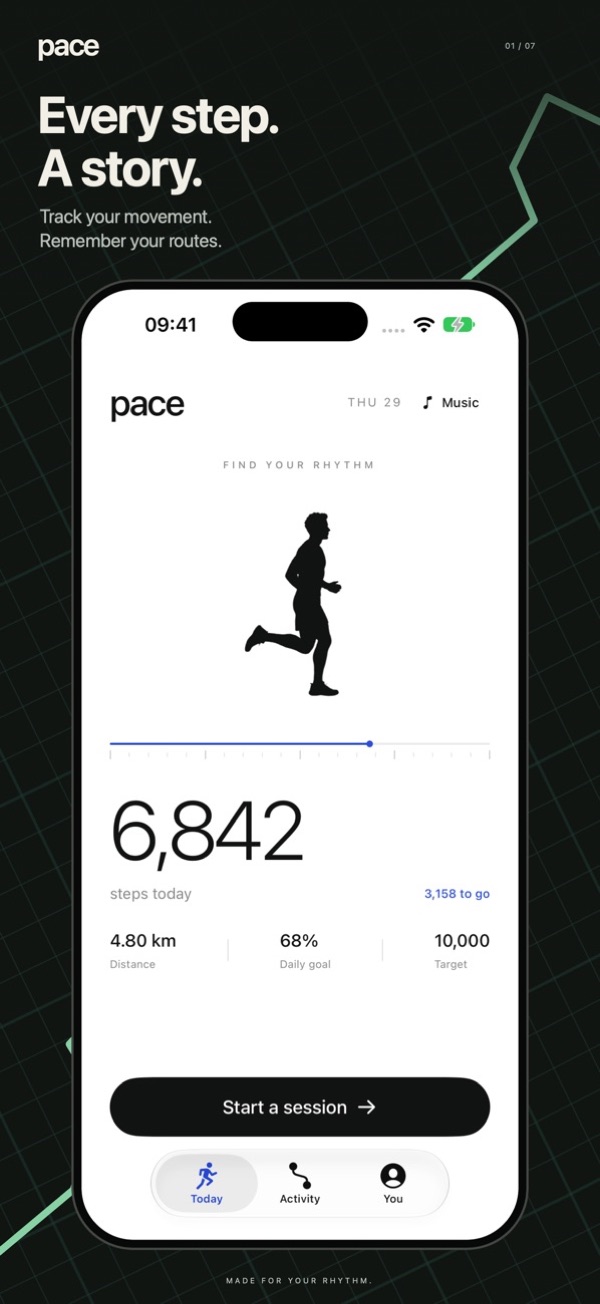
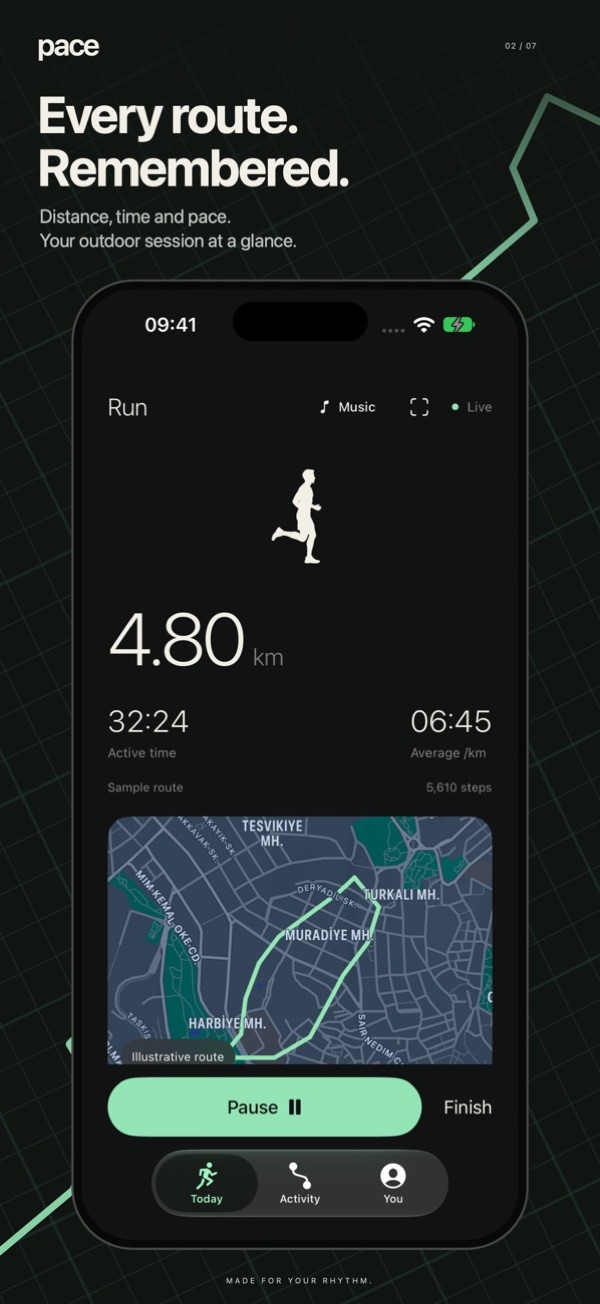
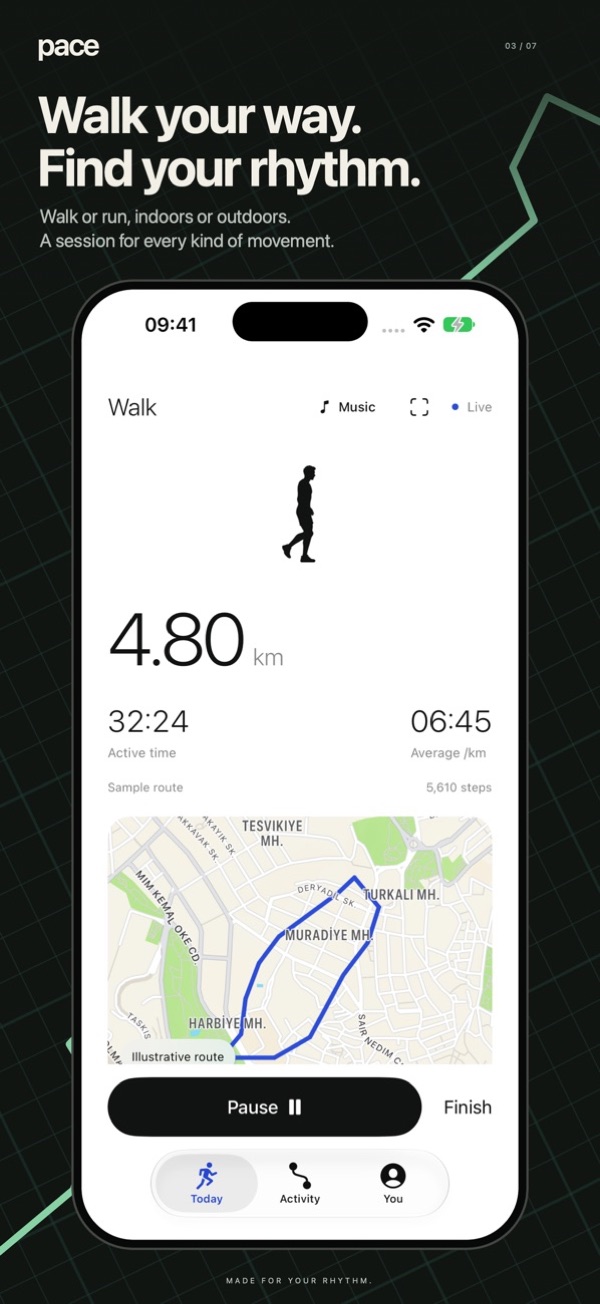
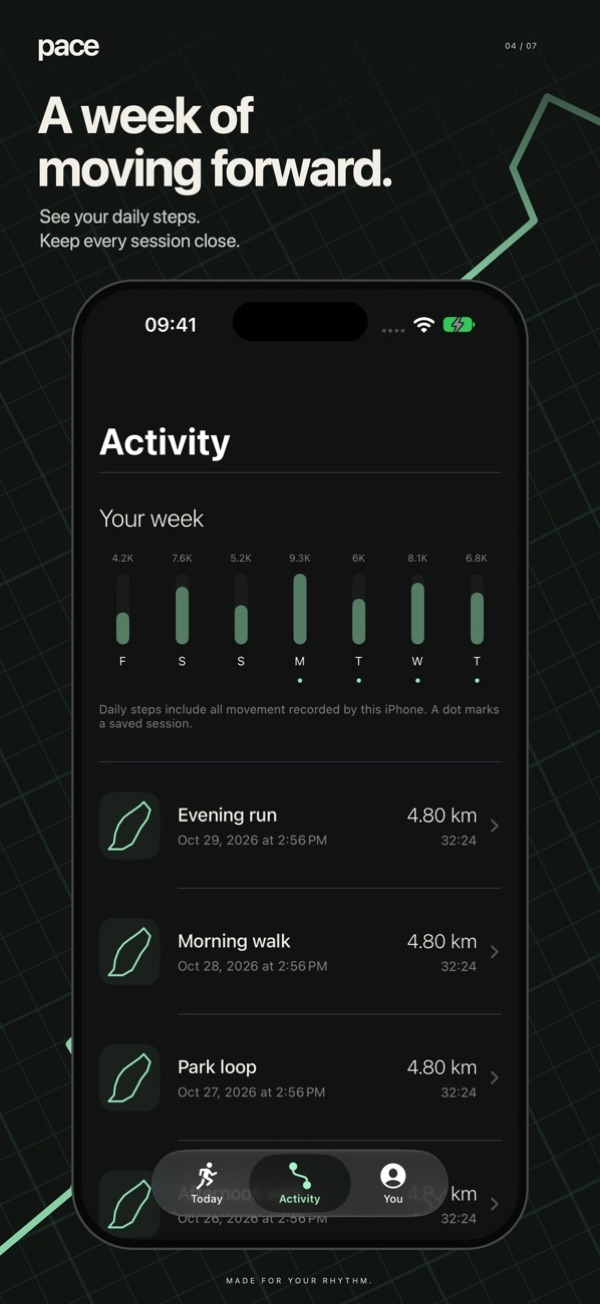
What we like
- Steps plus GPS walks and runs with splits
- Indoor treadmill sessions
- Privacy label: Data Not Collected
- One-time price, no in-app purchases
Keep in mind
- No Apple Watch app yet
- No widgets yet
- No social features
- New version with few ratings so far
Full disclosure first: Pace is made by Sensonet, the company that publishes The App Verdict. We scored it with the same weights as everyone else, and it's here because it fills a gap the others leave open: a step counter that also records proper walks and runs, for a one-time price, without collecting anything.
The Today screen is a big step count and a progress bar toward your goal, with distance next to it. Start a session and Pace records your route with GPS, active time, average pace and kilometre or mile splits. If you pause or lose signal, the map shows a break instead of a straight line through buildings, which is a small touch most free trackers skip. There's also an indoor mode for the treadmill.
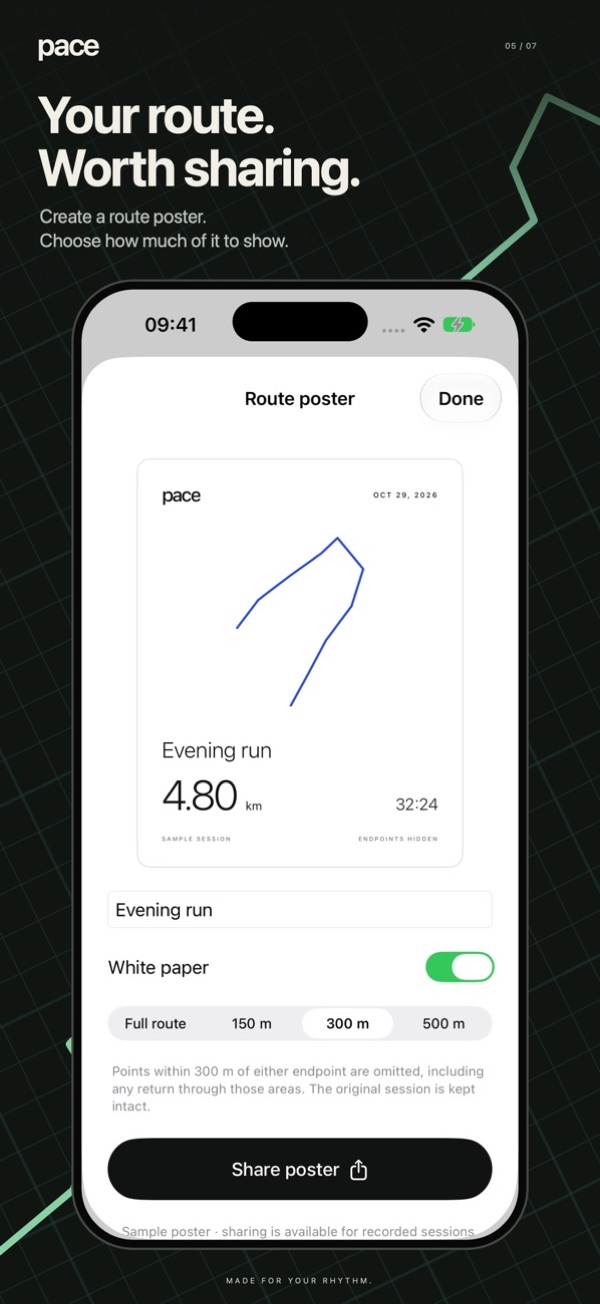
The extras are more personal than competitive. You can turn a route into a poster (with an optional privacy circle around your home), replay old routes, or race a previous session on the same path. Music from your library plays without a player taking over the screen.
Where it falls short: there's no Apple Watch app, no widgets and no friends or challenges. If those matter, Pedometer++ or StepsApp suit you better.
In-app purchases: No in-app purchases.
The pick if you want steps and walk maps in one app, pay once and never see a subscription screen.
StepsApp
What we like
- Friends, groups, leaderboards and challenges
- Syncs with Garmin, Oura, Fitbit, Whoop and more
- Lovely charts and streaks
- Wheelchair mode and 31 languages
Keep in mind
- GPS workouts and advanced stats need Pro
- Free version isn't ad-free
- Privacy label includes data used to track you
StepsApp is the most social app here. You can join groups, climb leaderboards and run challenges with friends, family or coworkers, which is the single best motivator for a lot of people. If your office does a step challenge every spring, this is the app to suggest.
It's also the best-looking at summarising your history: streaks, records and trend charts that make a good week look like a good week. It connects to far more than Apple Health, including Garmin, Oura, Fitbit, Whoop, Polar and Amazfit, so it works even if you've switched wearables over the years. A wheelchair mode is a welcome touch.
The free version is generous, but GPS workout tracking, advanced insights and an ad-free experience sit behind StepsApp Pro. Its App Store privacy label says identifiers and usage data may be used to track you across other companies' apps and websites.
In-app purchases: PRO is a subscription; yearly plans are listed between $19.99 and $32.99, monthly from $4.99.
Get it if competing with people you know is what keeps you walking.
Pacer
What we like
- GPS walks, hikes and rides with maps
- Weight and BMI tracking with guided plans
- Walking groups, clubs and challenges
- Highest rating of the group (4.9)
Keep in mind
- Many features push toward Premium
- Privacy label lists location data used to track you
- Busier interface than a pure step counter
Pacer is less a pedometer and more a walking coach. On top of steps, flights, calories and active time, it records GPS walks, hikes and rides, suggests local routes and trails, and lets you track your weight and BMI against a goal. Guided workouts and personalised plans are part of Premium.
The community side is strong too: walking groups, clubs and friendly challenges that work across iPhone and Android, plus live location sharing so family can see where you are on a walk. Its 4.9-star average from over 330,000 ratings is the highest of any app we looked at.
The trade-off is privacy and focus. The App Store label lists location as data that may be used to track you, and the app has a lot going on. If you just want a step count, it's more than you need.
In-app purchases: Premium is a subscription; listed prices range from $3.99 to $49.99.
Best if you're walking to lose weight and want a plan, a community and maps in one place.
Map My Walk
What we like
- Real-time GPS with audio updates on pace and distance
- Treadmill walks and 600+ activity types
- Saved and discoverable routes
- Huge, long-running community
Keep in mind
- Not really a background step counter
- MVP subscription is the priciest here
- Privacy label includes data used to track you
Map My Walk is the one to pick when a walk is a workout. You press start, it follows you with GPS and talks in your ear about pace, distance, time and calories. You can save routes, find new ones, log treadmill walks and choose from more than 600 activity types.
It syncs with Apple Watch and other smartwatches, and the stats after a walk (pace, elevation, heart rate, splits) are detailed. It has been on the App Store since 2011 and has the biggest ratings count of the group.
As a day-long pedometer it's less useful than the others; its strength is recorded sessions. The MVP subscription unlocks deeper analysis and is the most expensive plan we found, and the privacy label lists purchases and identifiers as data used to track you.
In-app purchases: MVP is a subscription; listed at $6.99–$9.99 a month or $19.99–$39.99 a year.
Choose it for structured walking workouts with audio coaching; pair it with a simpler step counter for the rest of the day.
Sweatcoin
What we like
- Earn coins for steps and spend them on offers
- Streaks and badges
- Free to use
Keep in mind
- Rewards are mostly discounts and offers, not cash
- No route recording
- Privacy label lists location and identifiers used to track you
If the question in your head is "which walking app pays you?", Sweatcoin is the best-known answer. You earn sweatcoins for steps and spend them in a marketplace of gadgets, gear and offers. Streak competitions with friends add a social push.
Be realistic about the rewards: they're mostly discounts and partner offers, and earning meaningful amounts takes a lot of walking. As a pedometer it's basic, and there's no GPS route recording.
The privacy label lists location and identifiers as data that may be used to track you, which is part of how a free rewards app pays its way.
In-app purchases: Premium and add-ons listed from $0.99 to $24.99.
Fun if rewards motivate you; just don't expect it to replace a proper step counter.
Stepz
What we like
- Simple, colourful step counter
- Imports your past steps from Apple Health
- Apple Watch app and friends
Keep in mind
- Weekly subscriptions are poor value
- Widget is a premium feature
- Least recently updated of the group
- Privacy label includes data used to track you
Stepz was featured by Apple back in 2015 and still does the basics well: automatic step counting with very little battery use, daily to yearly totals, floors climbed and an Apple Watch app. It can import all your past steps from Apple Health, so your history starts full.
It drops down the list because of pricing and privacy. Its paid options are mostly weekly subscriptions, even the widget is a premium feature, and its privacy label lists purchases, identifiers and usage data as data used to track you. It was also the least recently updated app we compared.
In-app purchases: Mostly weekly plans, listed at $3.99–$6.99 a week.
Fine, but Pedometer++ does the same job better.
Apple Health
Before you download anything: your iPhone has been counting steps since you set it up. Open Health, tap Steps and you'll see daily, weekly, monthly and yearly totals, plus walking distance and flights climbed. It's free, the data stays in Health on your device unless you share it, and it uses almost no extra battery.
What it doesn't do is motivate you. Health is built to store and chart data, not to nudge you out the door: there are no step streaks, badges or challenges. That's why the apps above exist; most of them read the same data from Health and present it better.
Check it first. If you never open it, that's your sign to try one of the apps above.
Which pedometer app should you pick?
How accurate is the iPhone step counter?
Pretty good, as long as the phone is on you. Since the iPhone 5s, a low-power motion coprocessor has counted steps in the background. In a study published in JAMA (Case et al., 2015), smartphone step counts on a treadmill landed within about 7% of the true number, which was closer than several wrist wearables tested at the time.
Where it goes wrong is placement. A phone in a front pocket sees your hips move with every step. A phone in a swinging bag, a pushchair cup holder or on the treadmill console sees much less, and will undercount. Pushing a shopping trolley has the same effect. If you also wear an Apple Watch, Health combines both so you don't double count.
Steps vs distance
Step counts come from motion. Distance is either estimated from your steps and stride length or measured with GPS. That's why a GPS-based walk in Pace, Pacer or Map My Walk will usually give a more reliable distance than a step-based estimate, especially if your stride changes between walking and running.
How we compared
We looked at each app's current US App Store listing on November 11, 2026: the description, price, every in-app purchase listed, the privacy label, the average rating and number of ratings, supported devices and the date of the latest update. Feature claims in this guide come from those listings, and we note where a feature needs a paid plan.
Each app gets five scores out of 10, combined with fixed weights: features 30%, value 20%, privacy 20%, reputation 15%, upkeep 15%. Features covers step tracking, goals, GPS, Apple Watch and extras. Value rewards useful free tiers and fair prices. Privacy starts at 10 and drops for data used to track you or used for advertising. Reputation reflects rating and number of ratings. Upkeep reflects how recently the app was updated and how widely it's supported. Apple Health isn't scored because it's built into every iPhone.
App prices, plans and privacy labels change. We re-check them when we update this guide; if you spot something out of date, tell us via our about page.
Pedometer app FAQ
Does the iPhone count steps without an Apple Watch?
Yes. Every iPhone since the iPhone 5s has a motion coprocessor that counts steps in the background while you carry it. You'll find the totals in the Health app under Steps. An Apple Watch only adds wrist-based data on top.
Does the iPhone count steps on a treadmill?
Yes, as long as the phone is on your body, in a pocket or an armband. If it sits on the treadmill console it won't count, because it isn't moving with you. Apps like Pace and Map My Walk also have indoor modes.
Does the iPhone count steps in a purse or bag?
Usually yes, but a bag swinging from your shoulder moves differently from your hips, so counts can be a little lower. A front trouser pocket is the most consistent place.
What is the most accurate pedometer app for iPhone?
Most pedometer apps read the same step data from the iPhone's motion coprocessor through Apple Health, so the count itself rarely differs between apps. Differences come from GPS distance, how apps fill gaps and whether they merge Apple Watch data.
What is the best free pedometer app without a subscription?
Apple Health is free and built in. Of the downloadable apps, Pedometer++ has the most useful free tier, with its subscription optional. If you're happy to pay once instead, Pace costs $1.99 with no subscription or in-app purchases.
Is there a pedometer app without ads?
Apple Health and Pace show no ads. Several free apps, including StepsApp, make the ad-free experience part of their paid plan.
Do pedometer apps drain your battery?
Step counting itself uses very little power because the motion coprocessor does the work. GPS route recording uses noticeably more, so it only runs during a session you start.
Which walking app pays you to walk?
Sweatcoin is the best known. It rewards steps with coins you can spend on offers and discounts. Rewards are modest, so treat it as a bonus rather than income.
Sources
- US App Store listings for each app, checked November 11, 2026.
- Case MA, Burwick HA, Volpp KG, Patel MS. Accuracy of smartphone applications and wearable devices for tracking physical activity data. JAMA. 2015;313(6):625–626.