The quick answer
- Best price/performance: Roomly, $2.99 once for everything, no ads, and compression before deletion.
- Never want to pay? Clever Cleaner has generous free daily limits and no ads.
- Try the free tools already on your iPhone first: Photos finds exact duplicates for you.
- Avoid weekly plans. Cleaning is something you do a few times a year, so a subscription rarely makes sense.
Search the App Store for “cleaner” and you'll find hundreds of apps promising to free up gigabytes in seconds. Most do a decent job of finding duplicate photos. The real difference is what they charge: many sell full access only as a weekly or yearly subscription, for a job most people do a few times a year.
So we ranked them on price/performance: what each app actually does, what it costs to unlock, and how safely it deletes. We compared eleven popular cleaners, including our own, and the free tools Apple already puts on your iPhone.
iPhone cleaner apps compared
Filter by what matters to you. Scores are explained in how we compared.
| App | Score | What's free | Paid plan | Cost for a year | Ads | Works on device* | US rating |
|---|---|---|---|---|---|---|---|
 1. RoomlyPrice/performance champion · Our app |
Everything visible, up to 1 GB freed | Pro $2.99 once | $2.99 once, then $0 | Never | Yes | New | |
 2. Clever CleanerBest free cleaner |
Generous daily limits, no ads | Weekly (3-day trial) or lifetime | $0 within daily limits | None | Yes | 4.8 (85K) | |
 3. AI CleanerMost tools |
Not stated | Not stated in the listing | Not stated | Not stated | Not stated | 4.6 (211K) | |
 4. CleanupMost popular |
7-day trial | Weekly, yearly or lifetime | Plan prices not listed | Not stated | Not stated | 4.6 (767K) | |
 5. Cleaner KitAll-in-one, by subscription |
Essential tools, some limited | Weekly or yearly | Plan prices not listed | Not stated | Yes | 4.4 (355K) | |
 6. Cleaner GuruOffline, by subscription |
Not stated | Subscription with free trial | Plan prices not listed | Not stated | Yes | 4.5 (148K) | |
 7. CleanMy®PhoneFrom the makers of CleanMyMac |
3-day trial | Yearly subscription | Yearly plan (price not listed) | Not stated | Not stated | 4.6 (23K) | |
 8. SlideboxBest swipe-to-sort |
Not stated | $4.99/mo, $49.99/yr or one-time | $49.99 (yearly plan) | Not stated | Not stated | 4.8 (17K) | |
 9. SwipewipeFun, photos only |
Not stated | Not stated in the listing | Not stated | Not stated | Not stated | 4.7 (103K) | |
 10. Boost CleanerWeekly only |
Not stated | Weekly subscription | 52 weekly payments (price not listed) | Not stated | Yes | 4.5 (67K) | |
 11. CCleanerFree version very limited |
Old and large images, screenshots | Paid version (price not listed) | Not stated | Not stated | Not stated | 4.6 (3K) | |
 iPhone's own toolsBuilt in, not scored |
— | Everything | None | $0 | No | Yes | Built in |
*What the App Store listing says about processing photos on your device; we didn't read privacy labels for this update. Prices, plans and ratings from each US App Store listing on November 19, 2026. “Not stated” means the listing doesn't say.
What a cleaner app really costs
Every app here is free to download, but most limit what you can delete until you pay, and most charge by subscription. Of the eleven, seven offer only weekly, monthly or yearly plans or don't say. A weekly plan renews 52 times a year, for something you'll probably use a few times.
Four let you pay once. Roomly unlocks everything for $2.99. Clever Cleaner and Cleanup offer lifetime options, and Slidebox a one-time unlock, without giving prices in their listings. Clever Cleaner is also usable for free within daily limits. If you start a free trial anywhere, set a reminder to cancel: Apple notes that cancelling during a trial can end your access straight away.
The 11 cleaner apps, reviewed
Roomly: Phone Storage Cleaner
What we like
- Pro is a one-time $2.99: no weekly or yearly plan
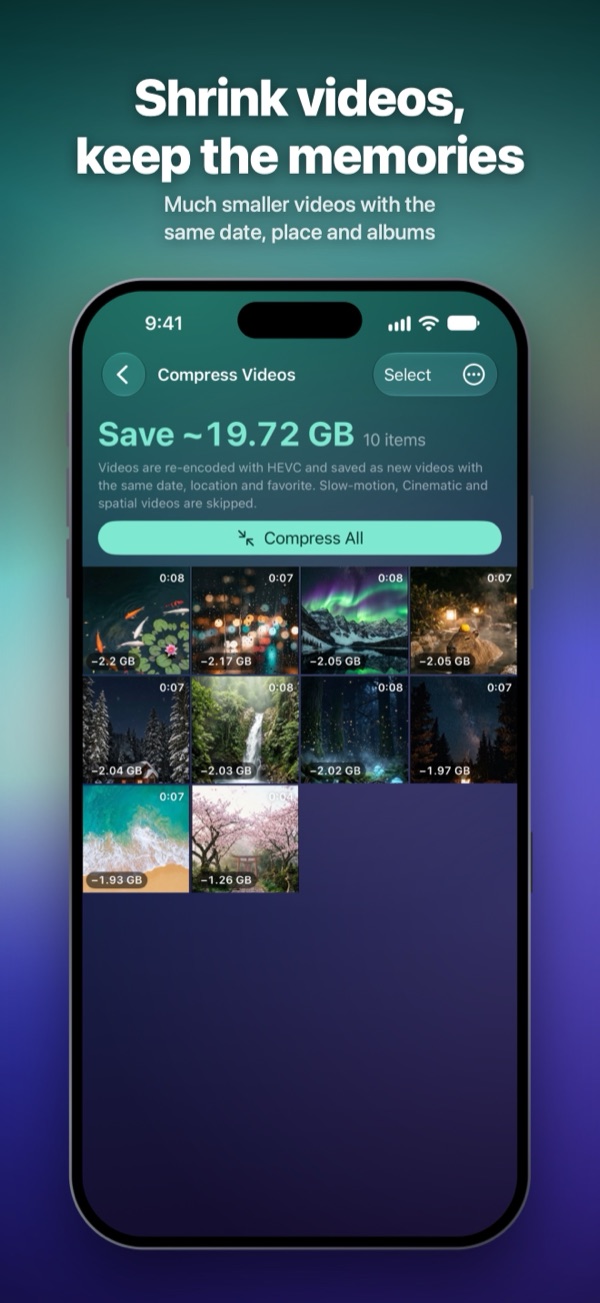
- Compresses videos with HEVC and photos to HEIC before you delete anything
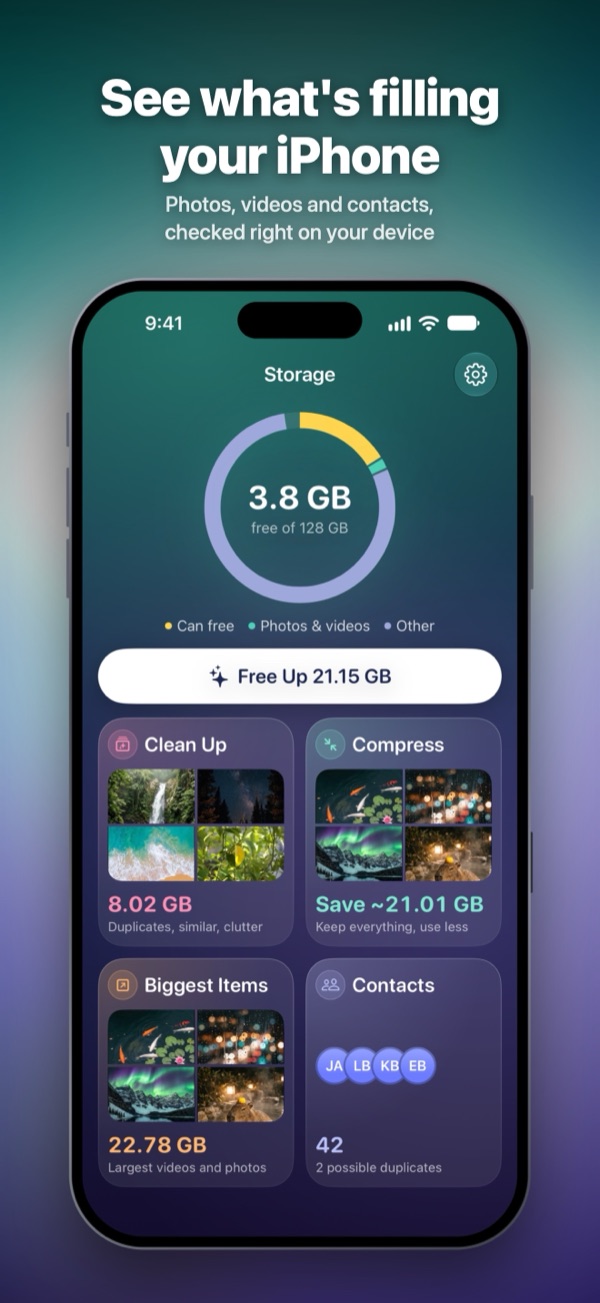
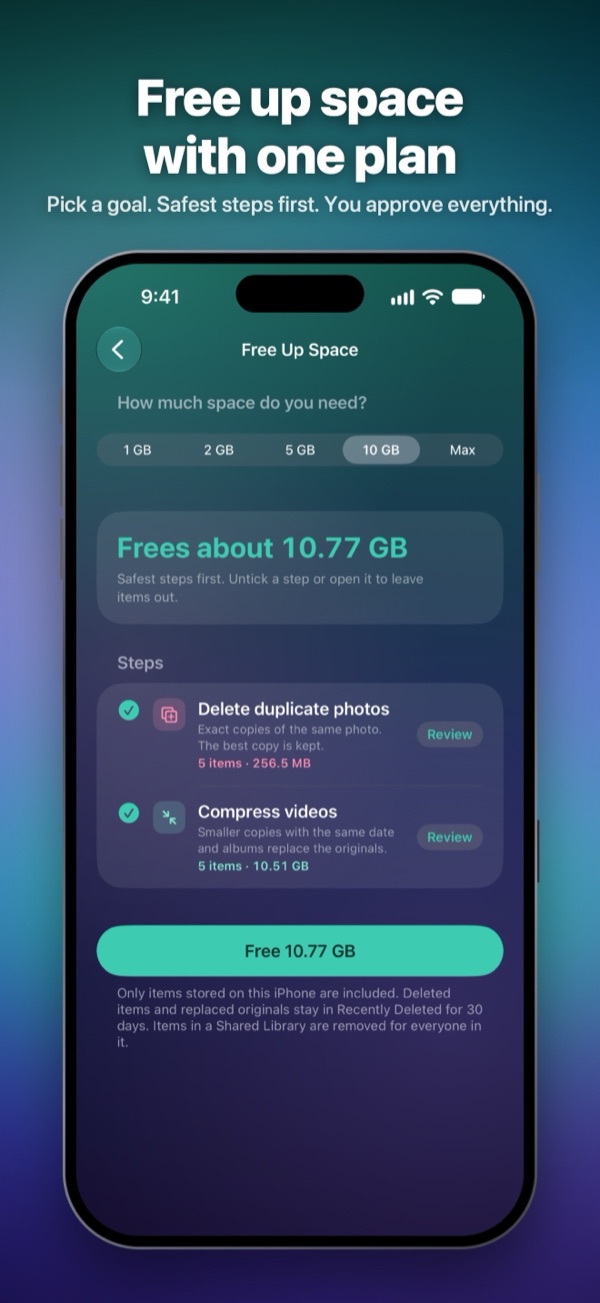
- Free Up Space plan: pick a goal, review the steps, confirm once
- Contacts backup, automatic iCloud Drive backups and duplicate merge included
- No ads, even in the free version
Keep in mind
- The free version stops after 1 GB freed in total
- No email or inbox cleaning
- Too new as Roomly to have US ratings yet
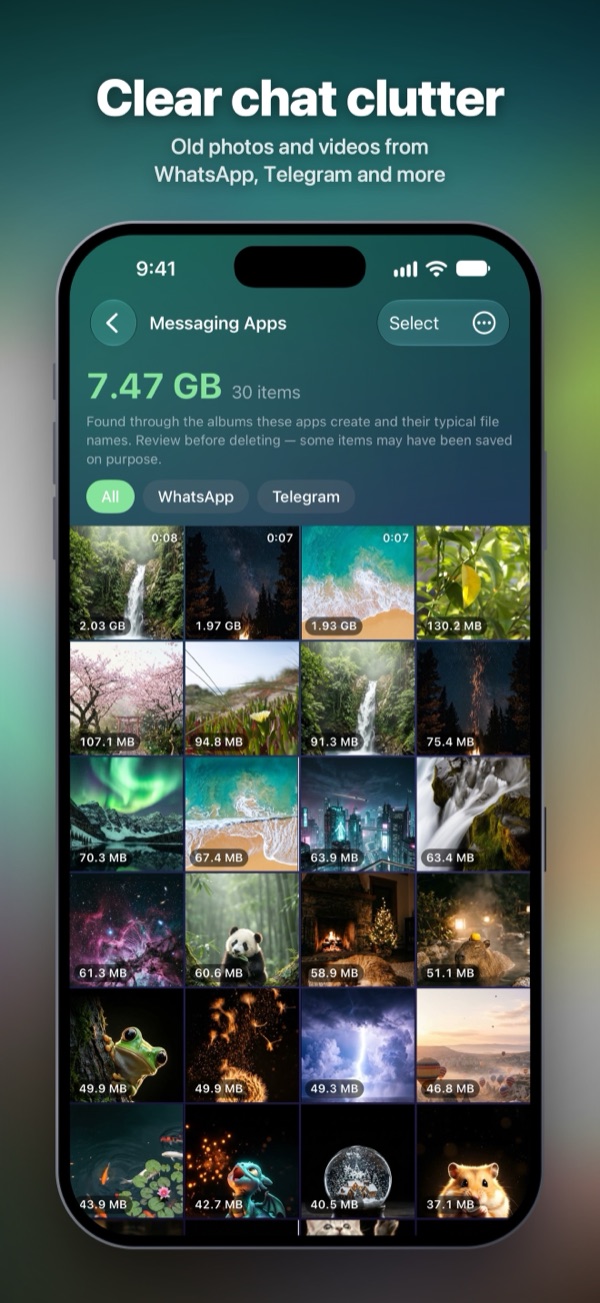
This one is ours, so weigh our words accordingly, and check the score breakdown. Roomly is the former My Contacts Editor, rebuilt as a storage cleaner. It shows what fills your iPhone, then builds a plan to free the amount you choose, 1, 2, 5 or 10 GB or as much as possible, starting with the safest steps. You review each step and confirm once.
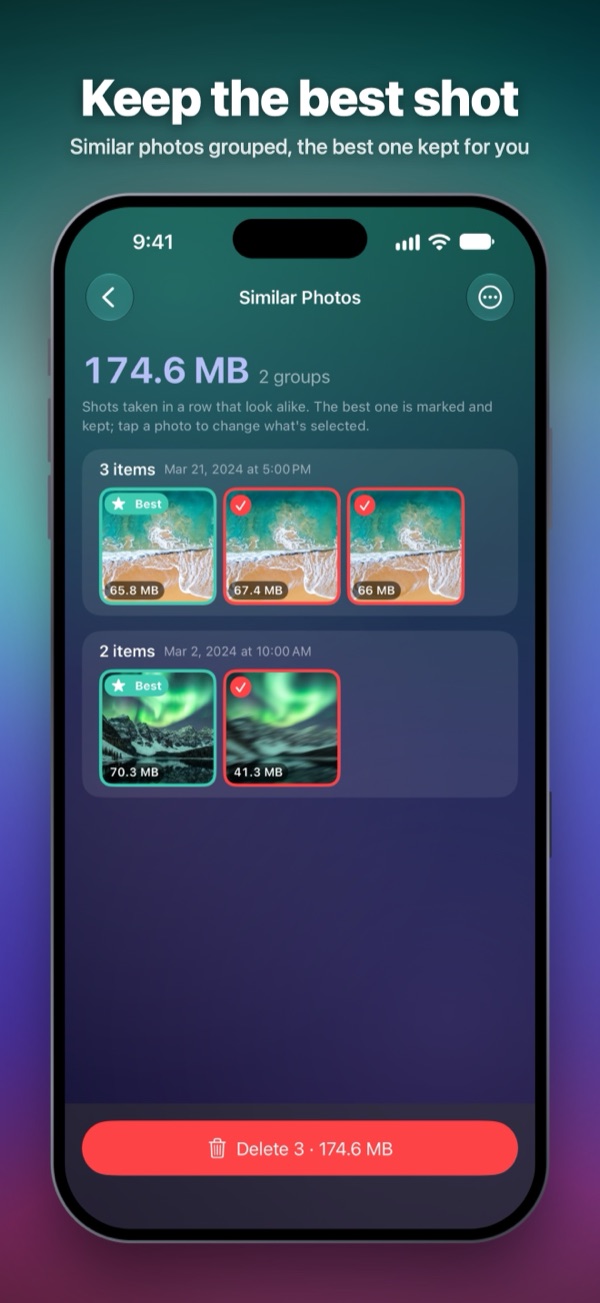
What earns it the top spot here is the price for what you get. Pro is a single $2.99 purchase that unlocks everything: HEVC video compression that keeps dates, places and albums, HEIC photo conversion, duplicate, similar, burst, blurry and dark photos, old screenshots, WhatsApp and Telegram media, plus contact backups, merging and calendar clean-up. Everything runs on your iPhone, and there are no ads anywhere in the app. The free version shows you everything and frees up to 1 GB, so you can see it work before paying.
Why Roomly wins on price/performance
- One payment of $2.99 unlocks every tool. Most cleaners here sell full access as a weekly or yearly subscription.
- It shrinks before it deletes: videos re-encoded with HEVC, often to less than half the size, and photos converted to HEIC, keeping dates, locations and albums.
- It covers more than photos: chat media, screenshots, contacts backups with automatic iCloud Drive copies, duplicate contacts and old calendar events.
- Nothing goes without your OK: every group can be reviewed, favorites are never suggested, and deletions stay in Recently Deleted for 30 days.
- No ads, ever: not in the free version, not after you pay. Cleaning your phone shouldn't mean watching videos between scans.
- Try it first: see everything and free up to 1 GB without paying.
The most cleaner for the money: every tool for $2.99 once, and no ads. Free up your first gigabyte free, and pay only if it earns it.
Clever Cleaner: AI CleanUp App
What we like
- Free daily limits that cover regular clean-ups
- No ads, according to the listing
- Compresses videos, photos, screenshots and Live Photos
- Swipe mode with no daily limit, and a Skip List
Keep in mind
- Daily limits slow down a big first clean-up
- No contact or calendar tools
- Premium is weekly or lifetime; the listing gives no prices
Clever Cleaner comes from CleverFiles, the makers of Disk Drill, and it's the strongest free option we found. It finds duplicate and similar photos, sorts videos by size, gathers screenshots, converts Live Photos to stills and compresses media, all on your device and without ads. A Skip List keeps chosen items out of every clean-up.
The free version works within daily limits, so a big first clean-up takes several days unless you upgrade. Premium is a weekly plan with a three-day trial, or a lifetime purchase; the listing doesn't give prices. It doesn't touch contacts or calendars.
The best choice if you never want to pay. Close behind Roomly, which unlocks more for a small one-time price.
AI Cleaner: Clean Up Storage
What we like
- Duplicates, swipe cleaning, email clean-up and unsubscribe
- Compress photos and videos at three levels
- Private vault, contact clean-up and old-event remover
Keep in mind
- The listing doesn't explain what's free or what Premium costs
- Doesn't say whether processing happens on your device
AI Cleaner packs in more tools than most: duplicate photos and videos, a swipe mode, inbox clean-up with unsubscribe, photo and video compression at three levels, a private vault, contact clean-up and an old-event remover for your calendar.
Its listing says nothing about pricing, so check the purchase screen carefully before starting a trial. Feature for feature it's close to Roomly; on price, we can't tell you.
Feature-packed and popular. Read the paywall before you tap anything.
Cleanup: Phone Storage Cleaner
What we like
- The most-rated cleaner on the App Store
- Photos, videos, email, contacts and compression in one app
- A lifetime option alongside subscriptions
Keep in mind
- Built around a 7-day trial that renews into a paid plan
- The listing doesn't give prices
- Doesn't say whether processing happens on your device
With more than 760,000 ratings, Cleanup is the cleaner most people have tried. It covers duplicate photos and videos, lookalike screenshots, video compression, spam and promotional email, and duplicate contacts.
Unlimited cleaning comes with a seven-day free trial, and the listing says it renews into a paid plan unless you cancel. It also mentions weekly and lifetime options, without prices. If you try it, set a reminder before the trial ends.
Capable and hugely popular, but you pay for that every week unless you choose lifetime.
Cleaner Kit – Clean Up Storage
What we like
- Photos, videos, email and contacts in one app
- Video compression and a secret folder
- Says it works on your device with no internet needed
Keep in mind
- Full access is a weekly or yearly subscription
- No one-time option in the listing
Cleaner Kit does everything the big cleaners do: duplicate and blurry photos, swipe sorting, video compression, inbox clean-up, contact merging and a secret folder for private photos. The listing says it runs on your device and nothing is uploaded.
Full access is billed weekly or yearly, with no one-time option listed. Fine for a one-month clean-up if you cancel; expensive to keep.
Thorough, but a subscription for a job you do once in a while.
Cleaner Guru: Clean Up Storage
What we like
- Duplicate photos with a best-shot pick
- Video compression and Gmail inbox clean-up
- Says it works offline with no tracking
Keep in mind
- Subscription-based; prices aren't in the listing
- Says it auto-merges contacts, so check the result
Cleaner Guru marks the best shot among duplicates, compresses videos, bulk-deletes email (Gmail included) and merges duplicate contacts. It states that it works completely offline, with no uploads and no tracking.
It's sold as a subscription with a free trial, and the listing links to its billing terms rather than giving prices.
A good offline cleaner, at a subscription price.
CleanMy®Phone: Cleanup Storage
What we like
- Polished design from MacPaw
- Blurry photos, screenshots, large videos and duplicates
- Contact merge and video compression
Keep in mind
- A yearly subscription after a 3-day trial
- Not updated since June 2026
MacPaw, maker of CleanMyMac, brings the same polish to iPhone. CleanMy®Phone finds blurry photos, old screenshots, large videos and duplicates, merges similar contacts and compresses videos, and reminds you that deleted items can be recovered from Recently Deleted.
It's a yearly subscription with a three-day trial. It's a good app, but a year's subscription costs more than most people need for an occasional clean-up.
Polished and trustworthy, priced as a yearly subscription.
Slidebox: Photo Cleaner App
What we like
- Swipe through photos and sort them into albums
- Undo any action
- A one-time unlock is offered
Keep in mind
- A photo organiser, not a storage cleaner: no compression or contacts
- $4.99 a month or $49.99 a year
Slidebox is a pleasant way to go through your camera roll: swipe up to delete, sort photos into albums with a tap and compare similar shots side by side. Every action can be undone.
It's a photo organiser rather than a full cleaner, with no compression or contact tools. The listing gives clear prices: $4.99 a month or $49.99 a year, with a one-time unlock also available.
Lovely for sorting photos by hand; not a full storage cleaner.
Swipewipe: Photo Cleaner
What we like
- Swipe month by month through your library
- On This Day and a photo map make it enjoyable
- Highly rated
Keep in mind
- Photos only: no compression, duplicates finder or contacts
- The listing doesn't mention pricing
Swipewipe turns cleaning your camera roll into a game: go month by month and swipe right to keep, left to delete, with On This Day memories and a photo map along the way.
It's great for a manual tidy, but it doesn't compress, find duplicates automatically or clean anything beyond photos. The listing doesn't mention pricing.
Fun for a manual tidy-up, but it won't do the heavy lifting.
Boost Cleaner – Clean Up Smart
What we like
- Duplicates, bursts and similar photos
- Contact merge, backup and group delete
- Says it processes everything locally
Keep in mind
- Premium is weekly only
- No video compression listed
Boost Cleaner covers duplicate, burst and similar photos and has a good set of contact tools, including backup and restore. It says everything is processed on your device.
Premium is a weekly subscription, with no yearly or one-time option in the listing. That's the most expensive way to pay for a tool you'll use now and then.
Decent tools, but weekly-only pricing is hard to justify.
CCleaner – Phone Cleaner
What we like
- A familiar name from the PC world
- Swipe clean, media and contact cleaners, compression
- Clean Share removes location data before posting
Keep in mind
- Duplicate and similar photo cleaning needs the paid version
- The vault holds 10 items for free
- Not updated since April 2026
CCleaner for iPhone offers swipe cleaning, a media cleaner, a contact cleaner, compression and a private vault, plus Clean Share, which strips location and time data before you post a photo.
The listing is upfront that the free version only finds old, large images and screenshots; duplicates, similar and bad photos need the paid version.
A familiar name, but the free version does little.
Free option: the tools already on your iPhone
Your iPhone can already find exact duplicates. In Photos, scroll to Utilities and open Duplicates to merge copies of the same photo. In Settings, General, iPhone Storage, you'll see what takes up space and suggestions such as offloading apps you don't use.
What the built-in tools don't do is compress videos, find similar shots or blurry photos, or gather old WhatsApp media. That's where a cleaner app earns its place.
Start here: free and private. Use a cleaner when you want compression, chat media or a plan.
Which cleaner app should you get?
Before you clean: three safety checks
Check whether you use iCloud Photos. If you do, deleting a photo on your iPhone deletes it from iCloud and your other devices too. That's fine if you meant it, but it isn't a backup.
Know where deleted items go. Photos you delete with any of these apps go to Recently Deleted, where iOS keeps them for 30 days. Empty that album only when you're sure, because that's when the space is really freed.
Compress before you delete. Videos are usually what fill an iPhone, and re-encoding them with HEVC often halves their size without a visible difference. Roomly, Clever Cleaner, Cleanup, AI Cleaner, Cleaner Kit, Cleaner Guru, CleanMy®Phone and CCleaner all offer some form of compression.
How we compared
On November 19, 2026 we read each app's US App Store listing and latest release notes: what's free, what needs a paid plan and what it costs, the tools it offers, what it says about processing on your device, rating, number of ratings and the date of the last update.
This comparison is ranked on price/performance, so value carries the most weight. Each app gets four scores out of 10, combined with fixed weights: features 35%, value 40%, safety 10%, reputation 15%. Features covers how much the app can clean or shrink: photos, videos, compression, chat media, contacts, email and calendars. Value rewards free use and one-time prices, and marks down weekly subscriptions and listings that hide their prices. Safety covers reviewing before deleting, protecting favorites and working on the device. Reputation uses ratings and recent updates; Roomly is new under its current name, so it scores low here. We didn't read privacy labels for this update, so privacy isn't scored. Apple's built-in tools aren't scored. Prices and plans change often; if you spot something out of date, tell us via our about page.
iPhone cleaner FAQ
What is the best cleaner app for iPhone?
On price/performance, Roomly: it unlocks every tool, including video compression, HEIC conversion, duplicate and chat-media clean-up and contact backups, for a one-time $2.99, after freeing your first gigabyte free. Clever Cleaner is the best free option, and Cleanup is the most popular.
Is there a free iPhone cleaner app without a subscription?
Yes. Clever Cleaner works free within daily limits and has no ads. Roomly frees up to 1 GB free and then unlocks everything with a one-time $2.99, with no subscription. Apple's Duplicates album in Photos is free too.
Which iPhone cleaner apps have no ads?
Roomly has no ads at all, in the free version or after you pay. Clever Cleaner's listing also says it has no ads. Most of the other listings don't say, so check before you start a trial.
Are iPhone cleaner apps safe?
Most are, if you review before deleting. Photos deleted by any app go to Recently Deleted for 30 days. Prefer apps that let you review every group, protect favorites and work on your device, and be careful with weekly subscriptions and free trials.
Do cleaner apps make my iPhone faster?
Not really. They free storage, which helps when your iPhone is nearly full and can't update or take photos. iOS manages memory and background apps itself, so “speed boost” claims don't mean much.
How do I delete duplicate photos without an app?
Open Photos, scroll to Utilities and tap Duplicates. iOS lists exact copies and lets you merge them. For similar shots, bursts, blurry photos and compression you'll need a cleaner app.
How can I free up space without deleting photos?
Compress them. Roomly re-encodes videos with HEVC, often to less than half the size, and converts JPEG and PNG photos to HEIC, keeping dates, locations and albums. You can also turn on Optimize iPhone Storage for iCloud Photos.
Does deleting photos on my iPhone delete them from iCloud?
Yes, if iCloud Photos is turned on. Deletions sync to iCloud and your other devices. They stay in Recently Deleted for 30 days, so you can still recover them.
How do I cancel a cleaner app subscription?
Open Settings, tap your name, then Subscriptions, choose the app and tap Cancel Subscription. Do it at least a day before a trial or billing period ends.
Sources
- US App Store listings and release notes for each app, checked November 19, 2026.
- Apple Support: Cancel a subscription from Apple