The quick answer
- Want it free, with no catch? Genius Scan scans without limits, adds no watermark and keeps documents on your phone.
- Hate subscriptions? TurboScan Pro is $12.99 once and collects no data.
- Want AI help without uploading your paperwork? MaxScan runs its assistant on your iPhone, with free unlimited scanning.
- Only scan now and then? The scanner in Notes and Files is already on your iPhone.
- Never let a weekly trial roll over. $5.99 a week is about $311 a year.
A scanner app has one job: turn a photo of a page into a clean, straight, readable PDF. Almost every app on this list does that well, because the camera and the edge detection do most of the work. Where they differ is everything around the scan: how much you can do before a paywall appears, whether that paywall is a one-time price or a weekly charge, and how much the app shares about you while you scan your bank statements, contracts and passport.
We compared the most popular scanner apps on the US App Store, two that you can buy outright, and one of our own, plus the free scanner built into Notes and Files. 5 of the 8 apps whose privacy labels we checked say your data may be used to track you across other companies' apps and websites.
Scanner apps compared
Filter by what matters to you. Scores are explained in how we compared.
| App | Score | Price | What's free | Paid plan | Cost for a year | Tracks you* | US rating |
|---|---|---|---|---|---|---|---|
 1. Genius ScanBest free scanner |
Free | Unlimited scanning and PDFs | Optional Ultra, $39.99/yr | $0 (Ultra $39.99) | No | 4.9 (1.4M) | |
 2. TurboScan ProBest one-time purchase |
$12.99 | Nothing (paid app) | None | $12.99 once | No | 4.9 (298K) | |
 3. MaxScanBest for private AI · Our app |
Free | Unlimited scanning, 5 AI actions | None (Pro $1.99 once) | $0 (Pro $1.99 once) | No | New | |
 4. Adobe ScanBest for Acrobat users |
Free | Scanning, OCR up to 5 pages | Optional Premium (monthly) | $0 (Premium extra) | Yes | 4.9 (1.6M) | |
 5. Scanner ProMost polished paid scanner |
Free | Basic scanning and sharing | Subscription for the full app | Subscription | Yes | 4.9 (338K) | |
 6. CamScannerMost features, most interruptions |
Free | Basic scanning | Weekly, monthly, quarterly or yearly | Varies by plan | Yes | 4.8 (2M) | |
 7. iScannerMost AI extras |
Free | Trial | $20.99/yr, or a weekly plan | $20.99+ | Yes | 4.8 (1.4M) | |
 8. Tiny ScannerSimple, but subscription-led |
Free | Not detailed in listing | Weekly or yearly | Varies by plan | Yes | 4.8 (184K) | |
 9. Scanner AppWatch the weekly price |
Free | 3-day trial | $5.99/wk, $9.99/mo or $39.99/yr | Up to $311 | Not checked | 4.8 (75K) | |
 Notes & FilesBuilt in, not scored |
— | Free | Everything | None | $0 | No | Built in |
*From each app's App Store privacy label (“Data Used to Track You”). Prices as stated in each App Store listing or on the developer's site; where a listing doesn't show a price, we say so rather than guess. Prices and ratings from the US App Store, November 17, 2026.
Free to scan, or pay once
These apps let you scan as much as you like without a subscription. Two are free with optional extras, one is a single purchase, and one is free with a one-time upgrade.
Genius Scan
What we like
- Free with no scan limit, no watermark and no time limit
- Documents are processed on your iPhone
- Batch mode for stacks of pages, with shadow and distortion fixes
- Updated for iPhone Duo
Keep in mind
- Text recognition (OCR) and cloud export need Ultra
- Ultra is a subscription, with no one-time option
- Its privacy label lists contact info and content linked to you
Genius Scan has been around since 2010 and it's still the easiest recommendation in this list. The free version isn't a trial. You can scan as many pages as you like, batch-scan a whole stack, merge and split PDFs and email the result, with no watermark and no nag to upgrade before you can save. The edge detection is quick and the black-and-white filter gives clean, photocopy-style pages.
What you don't get for free is text recognition, password-protected PDFs, Face ID locking, automatic export to Dropbox or Google Drive, and Genius Cloud sync. Those come with Ultra at $39.99 a year. Most people scanning the odd form, letter or receipt will never need it. Nothing on its privacy label is used to track you.
The best place to start. Free, unlimited and private by default, and you only pay if you want OCR or cloud sync.
TurboScan Pro
What we like
- Pay $12.99 once and it's yours, with no subscription
- Collects no data at all, according to its privacy label
- Fast, reliable edge detection and a sharp black-on-white mode
- One-tap “Email to myself”
Keep in mind
- You pay before you can try it (a separate free TurboScan is also available)
- Its listing doesn't mention text recognition (OCR)
- Fewer extras than the subscription apps: no AI, and faxing is a separate app
TurboScan is the old-school answer to subscription fatigue. It costs $12.99, once, and has nearly 300,000 ratings averaging 4.9. It does the core job very well: it finds the page, straightens it, removes shadows and sets clean contrast for text, then saves multipage PDFs or JPEGs you can name, file and send.
Its privacy label is the cleanest here: the developer says it collects no data from the app. There's no account and no cloud of its own; you can upload or back up scans to iCloud Drive. The trade-off is fewer extras. If you want text recognition across every scan or an AI assistant, look elsewhere. If you want a scanner you buy once and forget about, this is it.
The scanner to buy if you hate subscriptions. $12.99 once, no data collected, and a reputation built since 2009.
MaxScan
What we like
- Free, unlimited scanning with no watermark
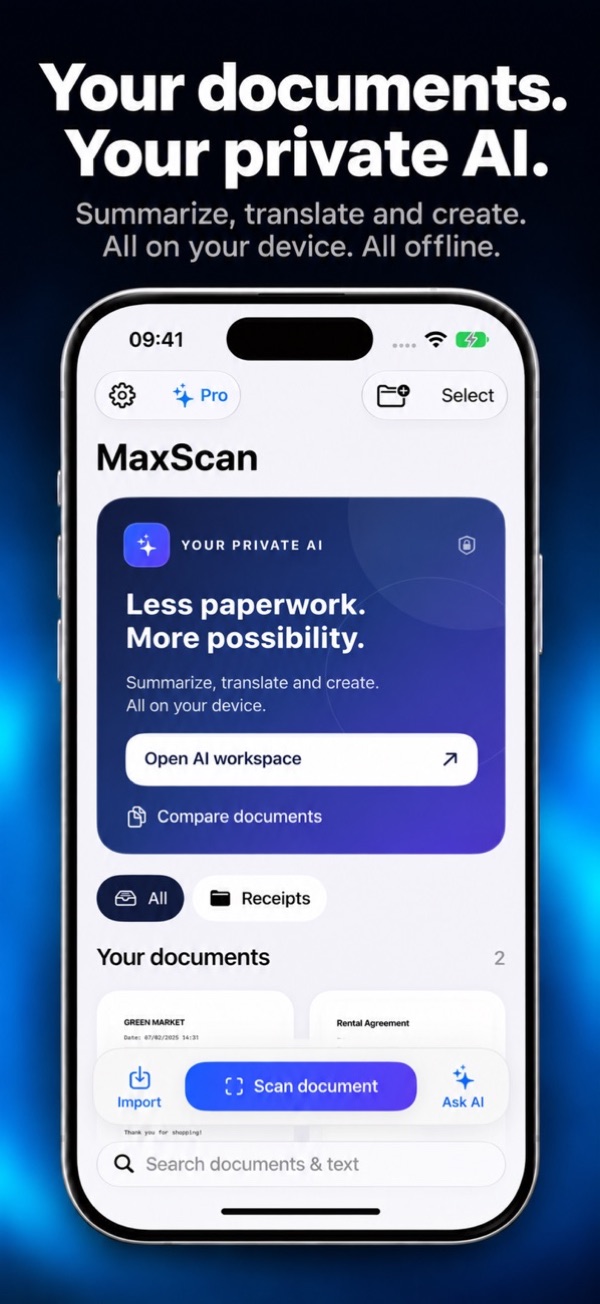
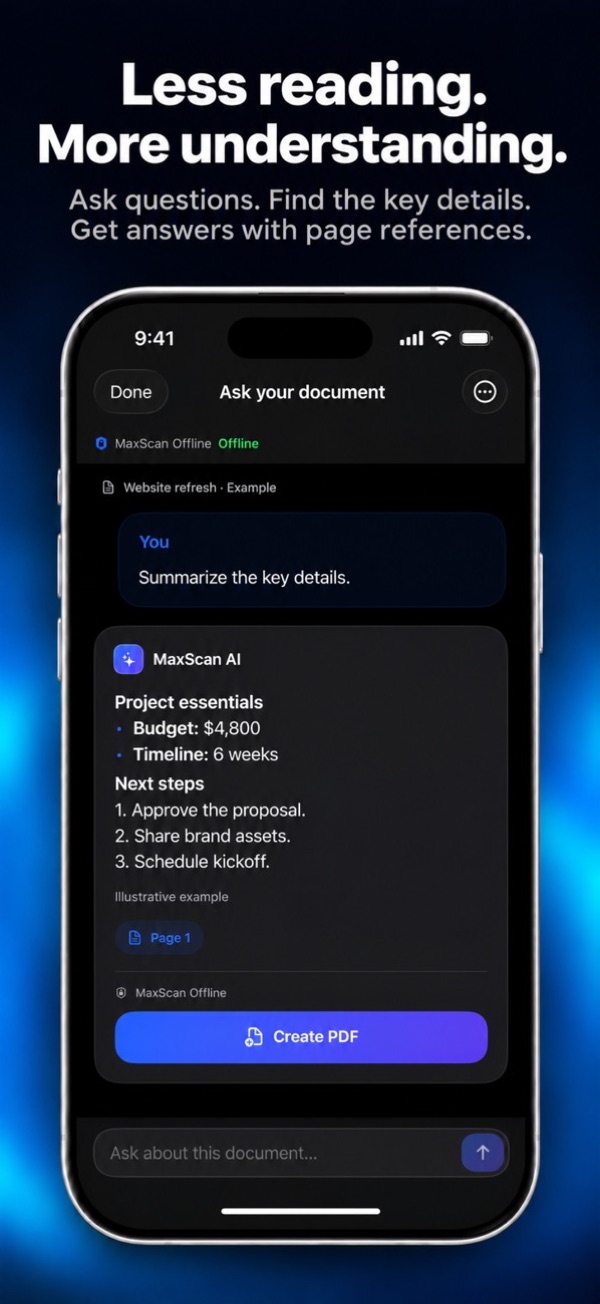
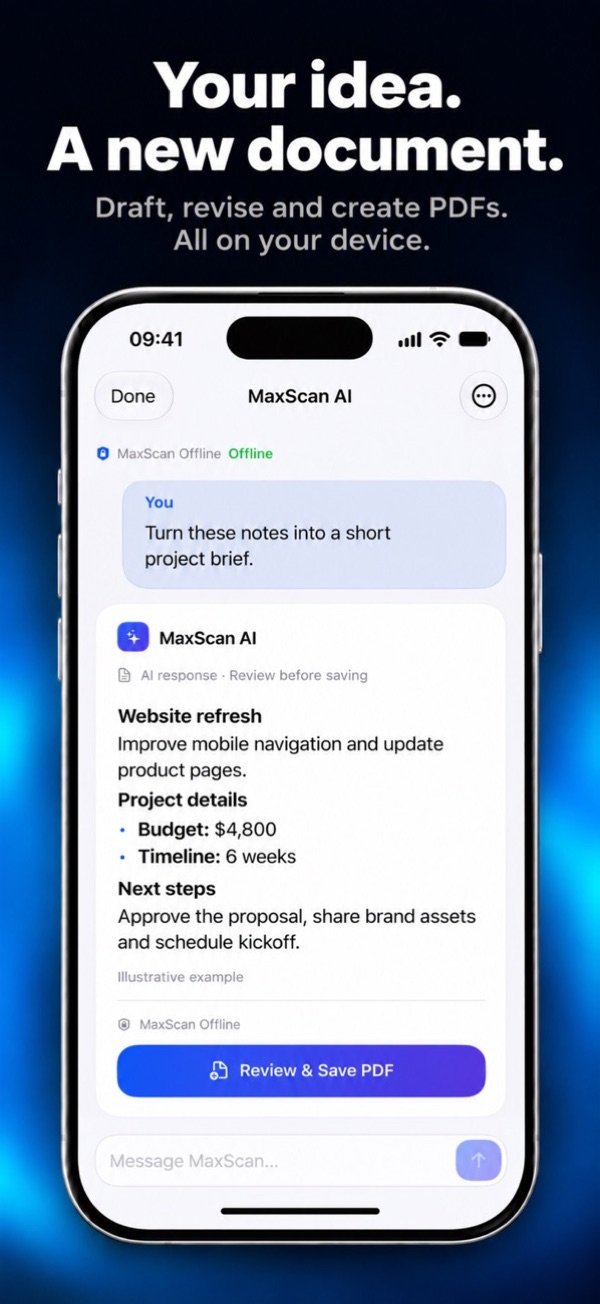
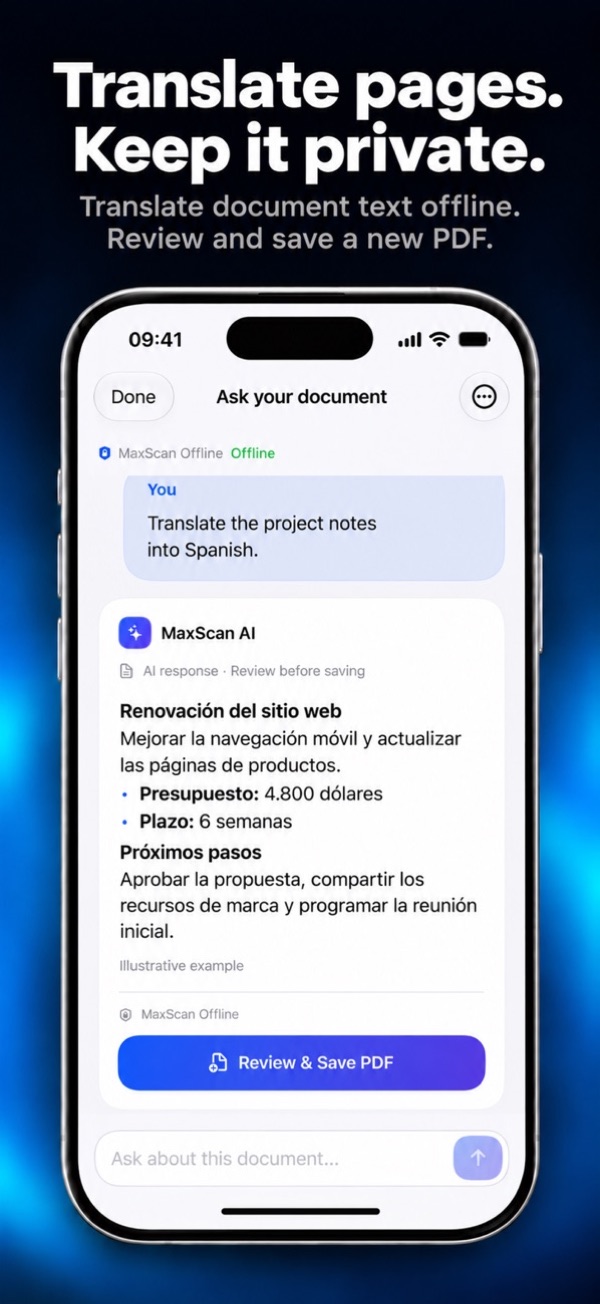
- An AI that answers questions, summarizes, translates and compares documents on your iPhone
- Works offline: documents are never sent to an AI server
- No ads, even in the free version
- Pro is a one-time purchase, not a subscription
Keep in mind
- The AI needs a recent iPhone with enough memory
- Too new to have US ratings yet
- No cloud sync or team features
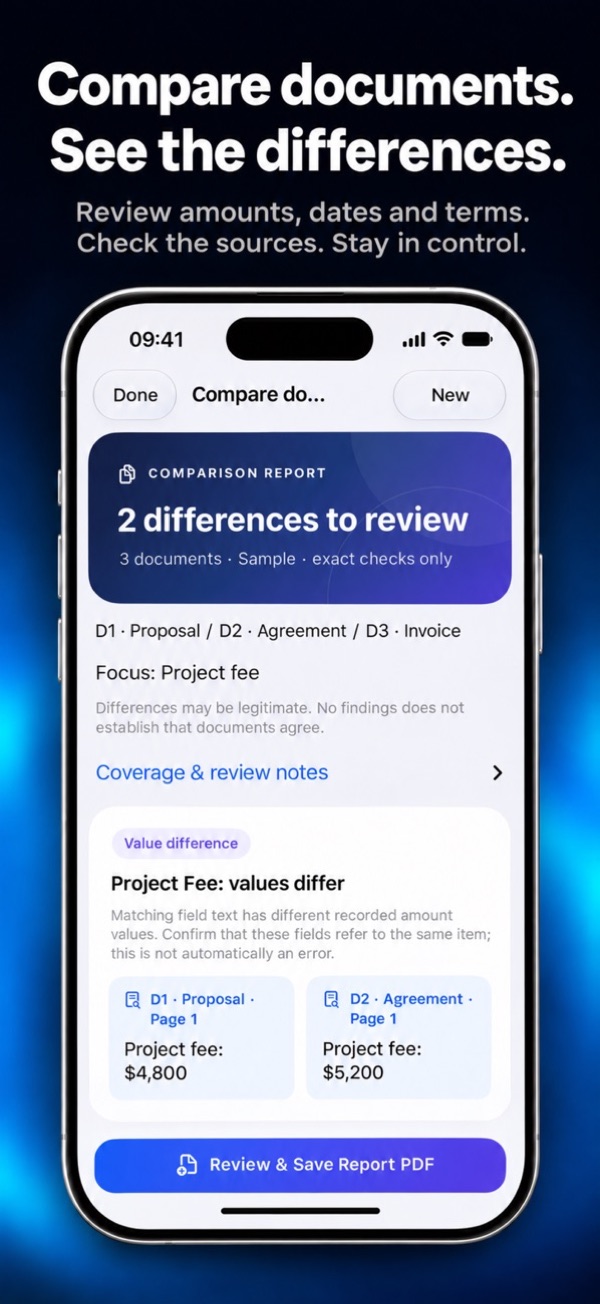
This one is ours, so weigh our words accordingly. We made MaxScan because we wanted AI help with paperwork without uploading the paperwork anywhere. Its assistant runs on the iPhone itself. You can ask a contract when the notice period ends, summarize a long letter, translate a page, or compare two to five versions of a document and get page references for each difference.
Scanning is free and unlimited, with automatic edges, crop, filters and page reordering, and no watermark. You can try five AI actions free. Pro is a single purchase that unlocks continued AI use, text search across your scans, smart folders, signatures, password-protected PDFs and receipt export to CSV. The app has no accounts, ads or analytics. The catch: older iPhones with less memory can scan but can't run the AI.
The pick if you want AI help with your paperwork without uploading it anywhere. Try the free AI actions on your own documents first.
Adobe Scan
What we like
- Excellent capture, with a Straighten tool for curved or tilted pages
- Magic eraser removes thumbs, stains and creases
- Free scanning, plus text recognition for small documents
- Scans open straight into Acrobat Reader to sign and fill
Keep in mind
- Needs an Adobe account, and scans are saved to Adobe's cloud
- Combining scans and OCR beyond 5 pages need Premium
- Its privacy label lists identifiers used to track you
Adobe Scan has some of the best capture tools here. It finds pages quickly, straightens curved book pages even when a corner is out of frame, and its Magic eraser cleans up fingers, shadows and creases. Scans become searchable PDFs, and the new Digitize tool turns handwritten notes and whiteboards into editable text.
It's free to scan, but it's built around Adobe's cloud: you sign in, and scans are saved to Adobe Document Cloud automatically. Premium, a subscription shared with Acrobat, raises text recognition from 5 to 100 pages and lets you combine scans into one file. The privacy label lists identifiers used to track you, and a long list of data linked to your Adobe account, including your documents.
Superb scanning, and the obvious choice if you already live in Acrobat. Less so if you'd rather not keep scans in Adobe's cloud.
Scanner apps built around a subscription
These are all capable scanners, and some have features the free apps lack. But the full app, and sometimes the basics, sit behind a recurring payment. Several offer a weekly plan, which is the most expensive way to pay.
Scanner Pro
What we like
- Beautifully made, by the team behind PDF Expert
- Text recognition, on-device PDF translation and smart filters
- Syncs scans between iPhone, iPad and Mac
- Auto-export to Dropbox, Google Drive, OneDrive and more
Keep in mind
- Many tools need a subscription
- Its privacy label lists identifiers used to track you
- Extras like measuring and object counting add clutter
Readdle's Scanner Pro is the most refined app in the subscription group. Scanning is fast and accurate, and the editing tools are well thought out: an eraser for marks and stray fingers, a signature you draw once and reuse, annotations and password-protected PDFs. Text recognition makes every scan searchable, and PDFs can be translated into more than 20 languages on the device.
Sharing unlimited scans by email or to another app is free, but many of its tools, from text recognition to sync, need a subscription. It's the one to pick if you scan every day and want your scans on your Mac and iPad too. Its privacy label lists identifiers used to track you, though nothing collected is linked to your identity.
The best experience if you're happy to subscribe. For occasional scanning, the free apps above do the job.
CamScanner
What we like
- A huge feature list: OCR, ID and passport modes, e-signatures, file conversion
- Strong page flattening for books that don't lie flat
- Lock folders and files with a password
- The most-rated scanner on the App Store
Keep in mind
- Recent reviews complain about frequent ads in the free version
- Subscriptions include a weekly plan
- Its privacy label lists identifiers and usage data used to track you
CamScanner has more features than almost anything else here. It scans to PDF, JPG, Word or text, has dedicated modes for IDs and passports, converts between a dozen file formats, and lets you sign, comment and share links for others to review. Paid users praise its book flattening and its automatic filters.
The free experience is another story. Several recent reviews describe ads appearing after scanning, before exporting and again when sending. Subscriptions are billed weekly, monthly, quarterly or yearly. The privacy label lists identifiers and usage data used to track you. For the record, the 2019 malware scare involved an advertising component in the Android version, not the iPhone app.
Powerful if you pay, frustrating if you don't. Most people will be happier with Genius Scan or TurboScan.
iScanner
What we like
- AI Chat can summarize, translate or rewrite a document
- OCR in 20+ languages, plus redaction and form filling
- A decoy password that opens a fake version of the app
- Extra tools: math solver, object counting, measuring
Keep in mind
- Built around a subscription, including a weekly plan
- The longest tracking list here: purchases, location, identifiers, usage and more
- Its AI Chat isn't described as on-device
iScanner tries to be every document app at once. Beyond scanning, it signs and fills forms, redacts text, merges and splits PDFs, sends faxes and adds an AI Chat that can summarize, translate or answer questions about a document. Its privacy extras are clever too, like a decoy password that opens a fake version of the app.
But it's a subscription app first. The listing shows a $20.99 yearly plan and a weekly plan that starts with a free trial. The privacy label is the most concerning in this guide: purchases, location, identifiers, usage data, diagnostics and other data may be used to track you across other companies' apps and websites. That sits oddly with an app that asks you to scan your passport.
Lots of features, but a lot of tracking for an app that handles IDs and contracts. Choose the yearly plan if you subscribe.
Tiny Scanner
What we like
- Simple and quick to learn
- Automatic border detection
- Cloud sync with free storage
- Watermarks and markup to protect copies of IDs
Keep in mind
- Weekly and yearly subscriptions, with no one-time option
- Its privacy label lists usage data used to track you
- Not updated since September
Tiny Scanner keeps things simple. Point, scan, and it finds the page, crops it and saves a PDF. It adds watermarks and markup, which is useful when you're sending a copy of an ID and want to mark what it's for, and cloud sync with some free storage.
Its listing offers weekly and annual subscriptions. The privacy label lists usage data used to track you, and contact info, identifiers and purchases linked to you. There's nothing wrong with it, but nothing it does justifies a subscription when Genius Scan does the basics for free.
Easy to use, but you'll get the same basics free elsewhere.
Scanner App: JPG, Photo to PDF
What we like
- The top App Store result for “document scanner” when we checked
- OCR, including handwriting recognition
- Automatic or manual capture
- Exports to iCloud, Dropbox, Google Drive and OneDrive
Keep in mind
- The trial rolls into $5.99 a week, about $311 a year
- Nothing meaningful is free beyond the trial
- Fewer ratings than the big names
When we searched the App Store for “document scanner”, this was the first app listed. It's a capable scanner, with automatic capture, edge detection, color correction and text recognition that can also read handwriting.
The pricing is the problem. Its listing describes a 1-week subscription at $5.99 with a 3-day trial, a monthly plan at $9.99 and a yearly plan at $39.99. If you start the trial and forget about it, the weekly plan works out at about $311 a year, which buys a lot of trips to a print shop. If you need it, take the yearly plan. Better still, try the free options first.
A decent scanner with an expensive default. Never let the weekly trial roll over.
The scanner in Notes and Files
You might not need an app at all. Every iPhone has a document scanner built into Notes and Files. In Notes, open a note, tap the attachment button and choose Scan Documents. In Files, tap the More button and choose Scan Documents, then pick where to save the PDF. It finds the page edges automatically, captures as soon as the page is steady, and lets you adjust the corners afterwards. In iOS 26 you can also choose the flash and a filter.
Scans in Notes can be signed with Markup, and Notes finds text inside them when you search. It's free, has no ads and sends nothing to anyone. What's missing is the organizing: there are no folders of scans, no batch tools and no receipt features. For a form you need to send today, it's often all you need.
Free, private and already on your phone. For the occasional form, try it before you download anything.
Which scanner app should you get?
What scanning really costs
Free-to-download doesn't mean free to use. The cheapest way to scan is the scanner already in Notes and Files, or Genius Scan's free plan, both $0. If you want to pay once, TurboScan Pro costs $12.99 and MaxScan Pro is a one-time upgrade. At the other end, Scanner App's weekly plan costs $5.99 a week after a 3-day trial: about $311 a year. Its yearly plan is $39.99, the same as Genius Scan Ultra.
Two habits save money. When a paywall appears, look for the yearly or one-time option before you tap the highlighted button, since weekly plans are often the default. And if you start a free trial, set a reminder for the day before it ends. You can cancel in Settings, under your name and Subscriptions; some apps end the trial as soon as you cancel, so don't do it on day one.
Do you need text recognition (OCR)?
OCR turns the picture of a page into text, so you can search your scans or copy a paragraph out of them. It's the feature most often behind a paywall. Before you pay for it, try what's built in: Live Text lets you select and copy text from photos, and Notes finds text inside its scanned documents when you search. You only need an app's OCR if you want searchable PDF files or search across hundreds of documents.
How we compared
We started with the scanner apps that rank highest in App Store searches for “document scanner”, “PDF scanner” and “scanner app”, and added the best-known one-time purchase. On November 17, 2026 we checked each app's US App Store listing: the price, the subscriptions and in-app purchases shown, the privacy label, the rating and number of ratings, and the date of the latest update. We also used developers' own pricing pages where the listing didn't show a price.
Each app gets five scores out of 10, combined with fixed weights: scanning 25%, value 25%, privacy 20%, reputation 15%, extras 15%. Value rewards apps that are free to use, not just free to download, and marks down weekly subscriptions. Privacy starts at 10 and drops for data used to track you or linked to your identity. Reputation reflects the rating, the number of ratings and how long the app has been around, which is why a brand-new app, including ours, scores low there. The built-in scanner isn't scored because it's part of iOS.
The list is grouped by how you pay rather than strictly ranked, so compare scores within each group. Prices and plans change often. If you spot something out of date, tell us via our about page.
Scanner app FAQ
What is the best free scanner app for iPhone?
Genius Scan. Its free version scans without limits, has no watermark and processes documents on your iPhone. You only pay if you want text recognition or cloud sync. If you scan rarely, the scanner built into Notes and Files is free too.
Does the iPhone have a built-in document scanner?
Yes. Open Notes, tap the attachment button and choose Scan Documents, or open Files, tap More and choose Scan Documents. It detects the page automatically and saves a PDF. You can sign scans in Notes with Markup.
Is there a scanner app without a subscription?
Yes. TurboScan Pro is a one-time $12.99 purchase. Genius Scan is free to use with no time limit, with an optional subscription for extras. MaxScan offers free unlimited scanning and a one-time Pro upgrade. Many popular scanners, including CamScanner, iScanner and Scanner App, are built around weekly or yearly subscriptions.
How do I scan a document to PDF on my iPhone?
In the Files app, tap More, choose Scan Documents, hold your iPhone over the page until it captures, then tap Save and choose a folder. The scan is saved as a PDF. Scanner apps do the same and add batch scanning, better filters and organizing.
Is CamScanner safe to use on iPhone?
The 2019 malware report involved an advertising component in CamScanner's Android app, which was removed. The iPhone app wasn't part of that. Its current App Store privacy label says identifiers and usage data may be used to track you, and recent reviews complain about ads. If that bothers you, Genius Scan or TurboScan are cleaner choices.
Is Adobe Scan free?
Scanning is free, with text recognition for small documents. You need an Adobe account, and scans are saved to Adobe Document Cloud. A Premium subscription raises text recognition from 5 to 100 pages and lets you combine scans into one file.
Which scanner app is best for receipts?
For free scanning, any app here will capture receipts well. For expenses, MaxScan exports receipt data to CSV with its one-time Pro upgrade. Adobe Scan can find receipts already in your photo library and turn them into PDFs.
Can I scan documents without an internet connection?
Yes. Apple's scanner in Notes and Files works offline, and so do Genius Scan, TurboScan and MaxScan, including MaxScan's AI features. Apps that save to their own cloud, such as Adobe Scan, need a connection to sync.
Is it safe to scan my passport or ID with an app?
Check the app's privacy label first. TurboScan's says it collects no data, and Genius Scan and MaxScan process documents on your device. Apps whose labels list data used to track you are a poor fit for identity documents. Wherever you scan, lock the app or password-protect the PDF before sending it.
Sources
- US App Store listings, privacy labels and release notes for each app, checked November 17, 2026.
- Genius Scan pricing, The Grizzly Labs
- Apple Support: How to scan documents on your iPhone or iPad