The quick answer
- Want a big library? Wallcraft, and if you pay, buy the $12.99 lifetime plan.
- Want it free? Everpix has thousands of free wallpapers, and your own Live Photos cost nothing.
- Want to pay once and be done? Theme Studio unlocks everything for $2.99, the cheapest one-time price here, shows no ads and brings your own photos and videos to life.
- Skip weekly subscriptions. A year of a weekly wallpaper plan can cost more than a new case.
Live wallpapers came back to the iPhone in iOS 17. Set a Live Photo as your Lock Screen and it plays a short animation every time you wake your phone. Wallpaper apps rushed to fill the gap, and many now charge a weekly subscription for a few seconds of motion.
We compared nine of the most popular live wallpaper apps, including one of our own, on what you get without paying, what a year costs and what each does best. We also show you two free options already built into your iPhone.
Live wallpaper apps compared
Filter by what matters to you. Scores are explained in how we compared.
| App | Score | What's free | Paid plan | Cost for a year | Ads | Privacy label | US rating |
|---|---|---|---|---|---|---|---|
 1. WallcraftBest overall |
Most wallpapers, with ads | $4.99/yr or $12.99 forever | $4.99, or $12.99 for life | Yes, until you pay | Not checked | 4.6 (165K) | |
 2. ZEDGEBest all-in-one |
Most wallpapers, live photos and ringtones | Some premium content (prices not stated) | $0 for free items | Not stated | Not checked | 4.6 (205K) | |
 3. Theme StudioBest one-time price · Our app |
Free designs as Live Photos, any design as a still | Pro $2.99 once | $2.99 once, then $0 | Never | Data Not Collected | New | |
 4. MyScreenBiggest library, weekly plan |
Limited | Weekly or yearly | Yearly plan (price not listed) | Not stated | Not checked | 4.5 (313K) | |
 5. EverpixBest free library |
Thousands of wallpapers, with ads | Premium (price not stated in the listing) | $0 with ads | Yes, until you pay | Not checked | 4.6 (33K) | |
 6. WallPicsGood maker, subscription |
Limited | Subscription (price not stated in the listing) | Subscription (price not listed) | Not stated | Not checked | 4.7 (56K) | |
 7. Live Wallpapers for MePopular, but not updated lately |
Some wallpapers, with ads | Premium subscription (price not stated) | Subscription (price not listed) | Yes, until you pay | Not checked | 4.5 (118K) | |
 8. intoLiveVideo tools, not a library |
Limited | Weekly, monthly or yearly | Yearly plan (price not listed) | Not stated | Not checked | 4.6 (115K) | |
 9. WavePay weekly to browse |
3-day trial | Weekly subscription | 52 weekly payments (price not listed) | Not stated | Not checked | 4.5 (42K) | |
 Your own Live PhotosBuilt in, not scored |
— | Everything | None | $0 | No | On your iPhone | Built in |
“Not stated” means the listing doesn't say. Prices, plans and ratings from each US App Store listing on November 17, 2026. We didn't read the other apps' privacy labels for this update, so privacy isn't scored.
What a live wallpaper app really costs
Most of these apps are free to download, but five of the nine sell full access only as a subscription, and three of those offer weekly plans. A weekly plan renews 52 times a year, so even a small weekly price turns into a big yearly bill for something you'll set once and look at for a few seconds a day.
Three apps let you skip subscriptions entirely. Theme Studio unlocks everything for $2.99 once. Wallcraft sells lifetime Pro for $12.99, or $4.99 a year. Everpix and ZEDGE are free if you don't mind ads or a smaller selection. If you start a free trial anywhere else, set a reminder to cancel before it ends.
The 9 live wallpaper apps, reviewed
Wallcraft – Wallpapers, live
What we like
- Live, video, double and parallax wallpapers, sized for your iPhone
- Artists add new wallpapers almost every day
- Pro is $12.99 once, or $4.99 a year
- A new widgets section
Keep in mind
- Ads until you buy Pro
- Exclusive wallpapers need Pro
- No tools to make your own live wallpapers
Wallcraft is the app we'd install first. It has a huge library of still, live and video wallpapers, cut to fit your iPhone's exact screen, and the listing says artists draw new ones almost every day. Plenty of it is free, with ads.
Pro removes the ads and unlocks the exclusive wallpapers. It's the best-value upgrade here: $4.99 a year, or $12.99 once for life. Most rivals charge more than that in a month. It doesn't help you make your own live wallpapers, so pair it with another app if that's what you want.
The best mix of library and price. If you upgrade, the $12.99 lifetime plan is the one to buy.
ZEDGE Ringtones & Wallpapers
What we like
- Live photos, wallpapers, ringtones and watch faces in one app
- 24-hour wallpapers that change through the day
- An AI wallpaper maker
- Millions of free items
Keep in mind
- A busy app that does far more than wallpapers
- Premium content pricing isn't explained in the listing
- Its live photo library is one section among many
ZEDGE started as a ringtone app and is now a one-stop shop for making your phone feel personal. Alongside ringtones and alarm sounds, it has a large wallpaper library, a section of live photos for the Lock Screen, Apple Watch faces and an AI wallpaper maker.
The listing says its live photos play once when you wake your phone, so they won't drain your battery, and it says millions of items are free. There's also premium content, but the listing doesn't explain what it costs.
Great if you want ringtones and watch faces too. A lot of app if you only want wallpapers.
Theme Studio: Live Wallpapers
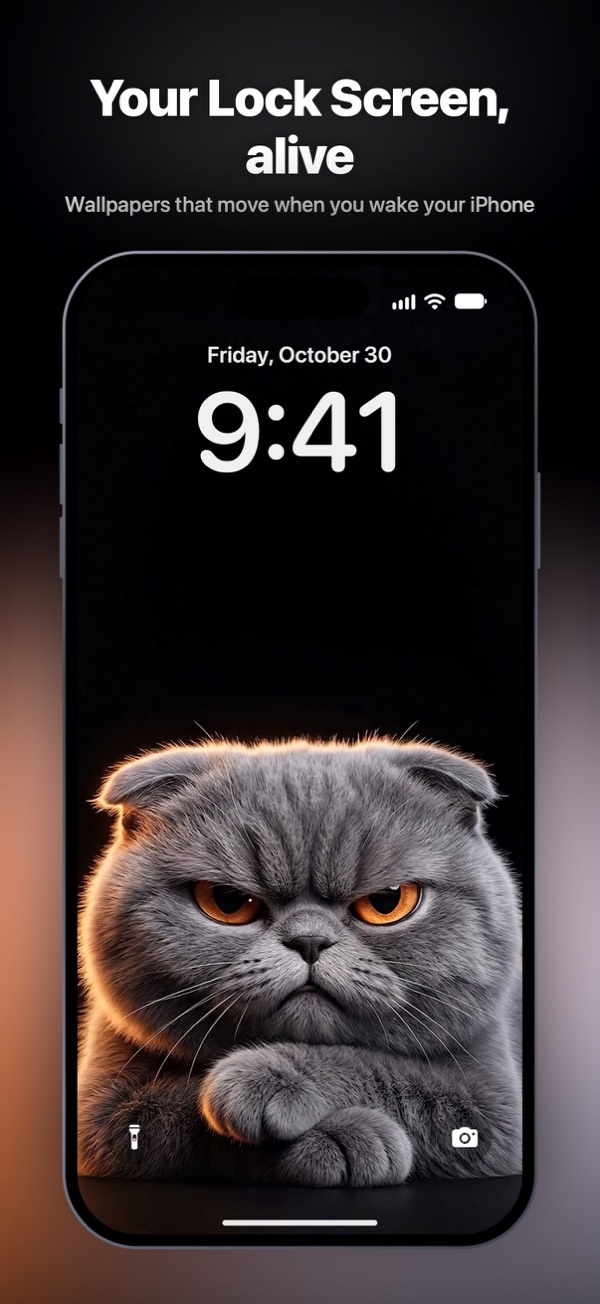
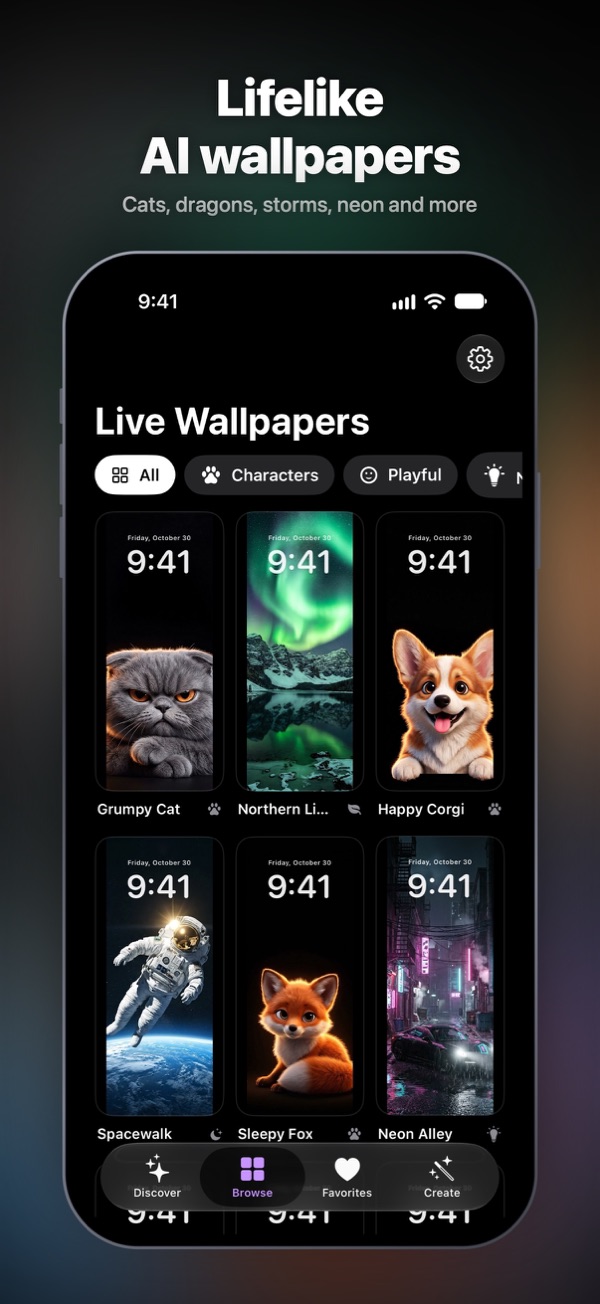
What we like
- Pro is a one-time $2.99, with no subscription
- Turns your own photos and videos into live wallpapers
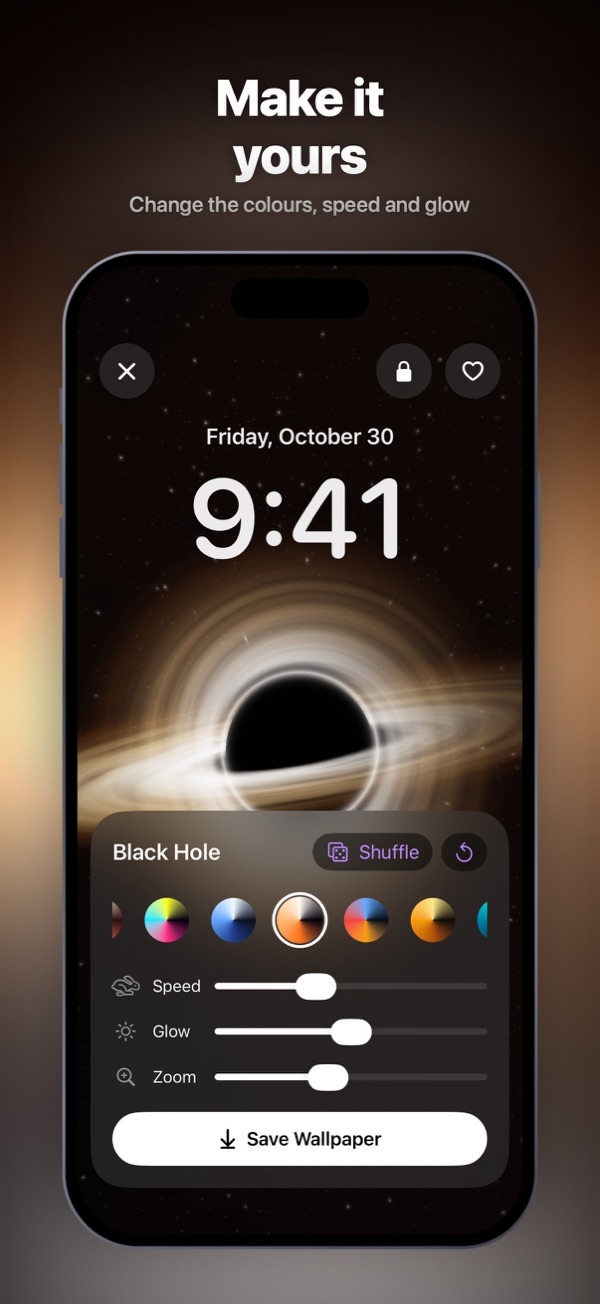
- Change colours, speed, glow and zoom of any design
- No ads, even in the free version
- No data collected, according to its privacy label
Keep in mind
- A smaller library than the big names: dozens of designs, not thousands
- Too new to have US ratings yet
- Unlimited photo and video conversions need Pro
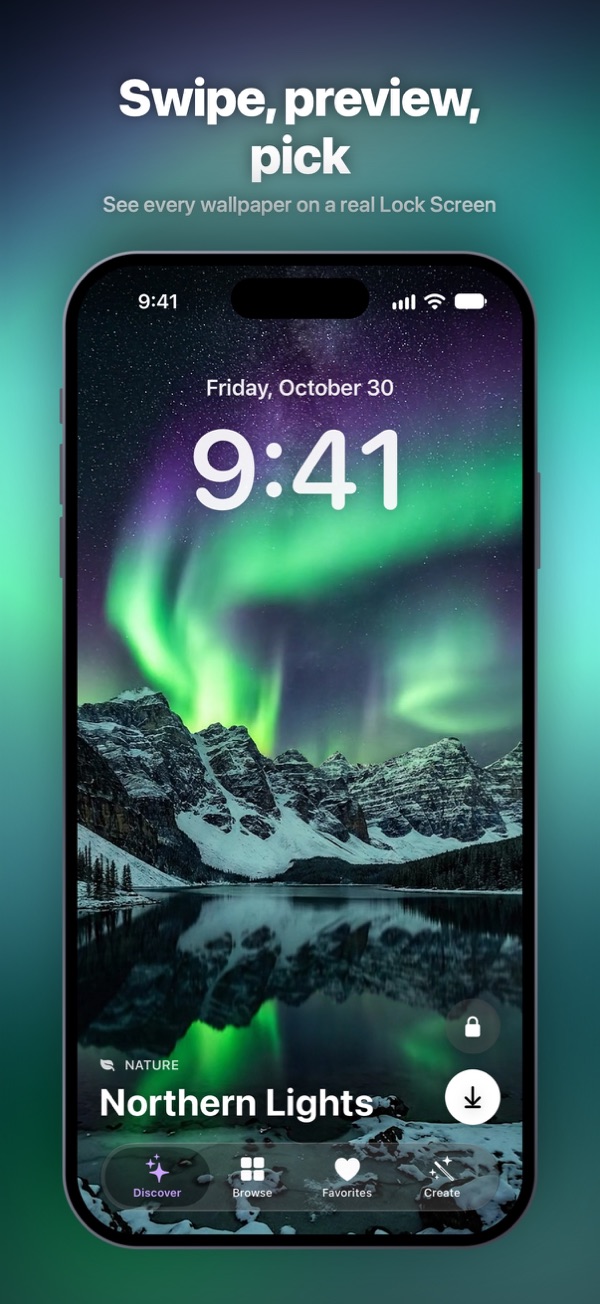
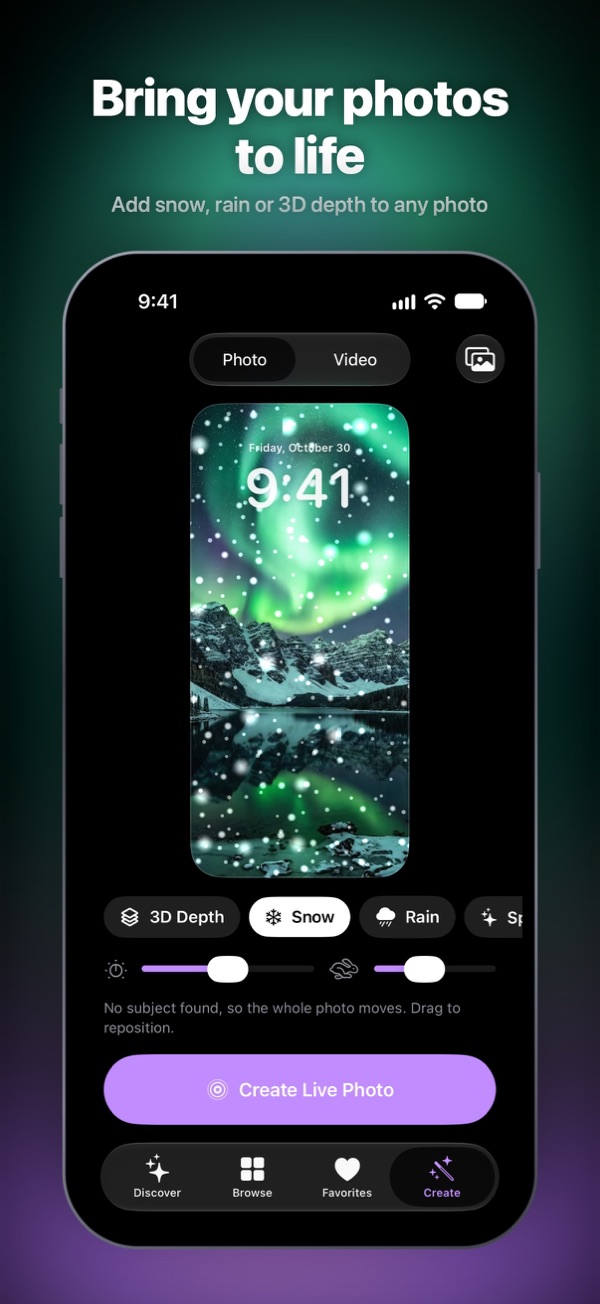
This one is ours, so weigh our words accordingly. Theme Studio has a smaller, hand-made library: lifelike scenes like a grumpy cat, a sleepy fox and the northern lights, plus animated designs such as galaxies and liquid chrome that you can recolour and speed up. Every wallpaper is previewed with the clock, like your real Lock Screen.
Its other half is a maker. Add snow, rain, sparkles or 3D depth to your own photos, or turn a video into a Live Photo wallpaper. You can save the free designs as Live Photos and any design as a still. Pro is a one-time $2.99 purchase that unlocks everything. There are no ads, in the free version or after you pay, and the app collects no data.
Why Theme Studio is the logical buy
- $2.99 once is the cheapest one-time unlock in this guide. Wallcraft's lifetime plan is $12.99, and five of the nine apps are sold only as subscriptions.
- It's the only app here that turns your own photos and videos into live wallpapers for a one-time price.
- Try before you pay: browse and preview every design, and save the free ones as Live Photos.
- Every wallpaper is previewed with the clock, so you see exactly how your Lock Screen will look before you save.
- No ads, ever. Wallcraft, Everpix and Live Wallpapers for Me show ads until you pay; Theme Studio never does, even if you never buy Pro.
- No data collected, according to its App Store privacy label.
The cheapest way to unlock everything and make your own live wallpapers, with no ads at all. Try the free designs first: if you like them, $2.99 is the whole price.
MyScreen – Live Wallpapers
What we like
- More than 17,000 wallpapers, widgets and themes
- AI wallpaper and avatar generator
- Matching widgets, icons and charging animations
- Updated this week, with iPhone Duo layouts
Keep in mind
- Unlimited access is a weekly or yearly subscription
- No one-time option in the listing
- Much more than you need if you only want a wallpaper
MyScreen is the most-rated wallpaper app in our test, and it does a lot: live and 4K wallpapers, an AI generator, ready-made themes with matching widgets and icons, charging animations and Apple Watch faces. Its library has more than 17,000 designs, and new ones arrive every week.
Unlimited access needs a subscription, weekly or yearly, according to the listing. If you only want a few live wallpapers, that's hard to justify. If you want to restyle your whole phone, it's the most complete kit here. Choose the yearly plan over the weekly one.
The best for a full Home Screen makeover. Avoid the weekly plan.
Everpix – Live Wallpapers 4K
What we like
- Thousands of wallpapers free, according to the listing
- Hand-picked and adjusted to fit each screen
- Live wallpapers added in its biggest update yet
- New designs every day
Keep in mind
- Ads in the free version
- Live wallpapers are new, so the live library is smaller
- Premium's price isn't given in the listing
Everpix has been around since 2014 and built its name on hand-picked still wallpapers. Its August 2026 update added live wallpapers, with new ones promised every day. The listing says you can use the app completely free, with ads.
Premium removes the ads and adds more exclusive wallpapers. The listing doesn't give a price, so check the purchase screen before you subscribe. If you mainly want good still wallpapers with a few live ones, the free version is enough.
The most generous free version here. Don't feel you need Premium.
WallPics – Live Wallpapers 4K
What we like
- Live wallpapers in 4K
- A DIY wallpaper maker with templates, text and stickers
- Charging animations and matching Lock and Home Screen sets
Keep in mind
- Built around a subscription
- The listing doesn't give prices
WallPics is one of the newer big names, launched in 2023 and rated 4.7. As well as live wallpapers in 4K, it has a DIY wallpaper maker with templates, text and stickers, charging animations and matching wallpaper sets for your Lock Screen and Home Screen.
It's built around a subscription, and the listing doesn't say what it costs. Check the price and the renewal period on the purchase screen before you start a trial.
Polished and well rated. Read the subscription screen carefully.
Live Wallpapers for Me
What we like
- Time-lapses, pets and abstract animations
- A maker for turning your videos into live wallpapers
- Well rated by more than 100,000 people
Keep in mind
- Not updated since July 2025
- Ads until you subscribe
- Premium is a subscription
This was one of the first popular live wallpaper apps, with time-lapse scenery, pets and abstract animations, plus a tool to turn your own videos into live wallpapers.
It hasn't been updated since July 2025, though, and the listing still promises new wallpapers weekly. Premium removes ads and unlocks everything, as a subscription. With fresher apps around, it's hard to recommend.
Once a favourite. Pick an app that's still being updated.
intoLive – Live Wallpapers
What we like
- Combines videos, photos, Live Photos and GIFs
- Strong editing tools
- Updated for iOS 27
Keep in mind
- Now mainly a video editor for social media
- Not a wallpaper library
- Full access is a subscription
intoLive made its name turning videos and GIFs into Live Photos you could use as wallpaper. Today its listing describes a video editor for TikTok, Reels and Shorts, though it can still combine videos, photos, Live Photos and GIFs.
If you want precise control over a clip before it becomes a wallpaper, it's capable. Full access needs a weekly, monthly or yearly subscription. If you only want to set a video as your wallpaper, a simpler tool will do.
Powerful, but it's a video editor now. Overkill for a wallpaper.
Wave, AI Live Wallpapers Maker
What we like
- A large library of AI-made live wallpapers
- Create wallpapers from a text description
- A redesigned, fast-to-browse app
Keep in mind
- The collection needs a weekly subscription
- The 3-day trial turns into a paid plan unless you cancel
Wave has a big collection of AI-generated live wallpapers, from fantasy landscapes to funny animals, and a generator that makes new ones from a text description. A recent redesign gave it a darker, glassy look.
According to the listing, you need its weekly subscription to access the wallpaper collection, after a three-day free trial. A weekly plan for wallpapers adds up quickly. If you try it, set a reminder to cancel before the trial ends.
Fun AI wallpapers, but a weekly subscription just to browse is too much.
Free option: your own Live Photos
You don't need an app to get a moving Lock Screen. Any Live Photo you've taken with your iPhone can be your wallpaper: open it in Photos, tap Share, choose Use as Wallpaper and make sure the Live Photo button is on. It plays when you wake your iPhone.
Apple also includes animated wallpapers, such as Astronomy and Weather, in the Lock Screen gallery. Press and hold the Lock Screen, tap the plus button and browse the collections. Both options are free, with no ads and no extra app.
The free, private place to start. Use an app when you want something you didn't film yourself.
Which live wallpaper app should you get?
How to set a live wallpaper, and why it might not move
Live wallpapers on iPhone are Live Photos. Whichever app you use, you save the wallpaper to Photos as a Live Photo, then open it, tap Share, choose Use as Wallpaper and check the Live Photo button is on. Wake your iPhone, or press on the Lock Screen, to see it move.
If it doesn't move, check Low Power Mode first: live wallpapers stay still while it's on. If iOS says motion isn't available, the clip may be too long or have too much movement for a wallpaper, so try another one or trim it in the app you used.
Live wallpapers only move on the Lock Screen. The Home Screen shows a still version. Because they play briefly when you wake your phone, rather than looping all the time, the effect on battery life is small.
How we compared
On November 17, 2026 we read each app's US App Store listing and latest release notes: what's free, what needs a paid plan and what it costs, ads, the size of the library, tools for making your own wallpapers, rating, number of ratings and the date of the last update.
Each app gets four scores out of 10, combined with fixed weights: library 30%, value 30%, tools 20%, reputation 20%. Library reflects how many good live wallpapers you get. Value rewards free wallpapers and one-time prices, and marks down weekly subscriptions and paywalls in front of the whole library. Tools covers making and customising your own. Reputation uses ratings and how recently the app was updated. We didn't read the other apps' privacy labels for this update, so privacy isn't part of the score this time. Apple's built-in options aren't scored. Prices and plans change often. If you spot something out of date, tell us via our about page.
Live wallpaper FAQ
What's the cheapest live wallpaper app with no subscription?
Theme Studio. Its Pro upgrade is a one-time $2.99 that unlocks every wallpaper and unlimited photo and video conversions. Wallcraft's lifetime Pro costs $12.99. Everpix and ZEDGE have free libraries with ads or premium extras.
What is the best live wallpaper app for iPhone?
Wallcraft is our top pick: a large library of live and still wallpapers sized for your iPhone, and a Pro upgrade that costs $12.99 once or $4.99 a year. Everpix is the best free option, and Theme Studio is best for turning your own photos and videos into live wallpapers.
Can you still have live wallpapers on iPhone?
Yes. Since iOS 17 you can set a Live Photo as your Lock Screen wallpaper, and it plays a short animation when you wake your iPhone. Apple also includes animated wallpapers such as Astronomy and Weather.
How do I set a live wallpaper on my iPhone?
Save the wallpaper to Photos as a Live Photo. Open it, tap Share, choose Use as Wallpaper and make sure the Live Photo button is on. Then wake your iPhone or press on the Lock Screen to see it move.
Why is my live wallpaper not moving?
Live wallpapers don't move in Low Power Mode, so turn it off first. Check that the Live Photo button was on when you set the wallpaper. If iOS says motion isn't available, try a shorter or calmer clip.
Do live wallpapers work on the Home Screen?
No. On iPhone, live wallpapers only move on the Lock Screen. Your Home Screen shows a still frame of the same wallpaper.
How do I turn a video into a live wallpaper?
Use an app that converts video to a Live Photo, such as Theme Studio, Live Wallpapers for Me or intoLive. Save the result to Photos, then set it as your wallpaper with Live Photo turned on.
Is there a live wallpaper app without a subscription?
Yes. Wallcraft sells lifetime Pro for $12.99, and Theme Studio's Pro is a one-time $2.99. Everpix and ZEDGE have large free libraries. Your own Live Photos are free too.
Is there a live wallpaper app without ads?
Yes. Theme Studio has no ads at all, even in the free version. Wallcraft, Everpix and Live Wallpapers for Me show ads until you pay for Pro or Premium. Your own Live Photos and Apple's built-in animated wallpapers are ad-free too.
Do live wallpapers drain the battery?
Not much. A live wallpaper plays briefly when you wake your iPhone instead of looping all the time, so the effect on battery life is small. They don't play at all in Low Power Mode.
Sources
- US App Store listings and release notes for each app, checked November 17, 2026.
- Apple Support: Change your iPhone wallpaper